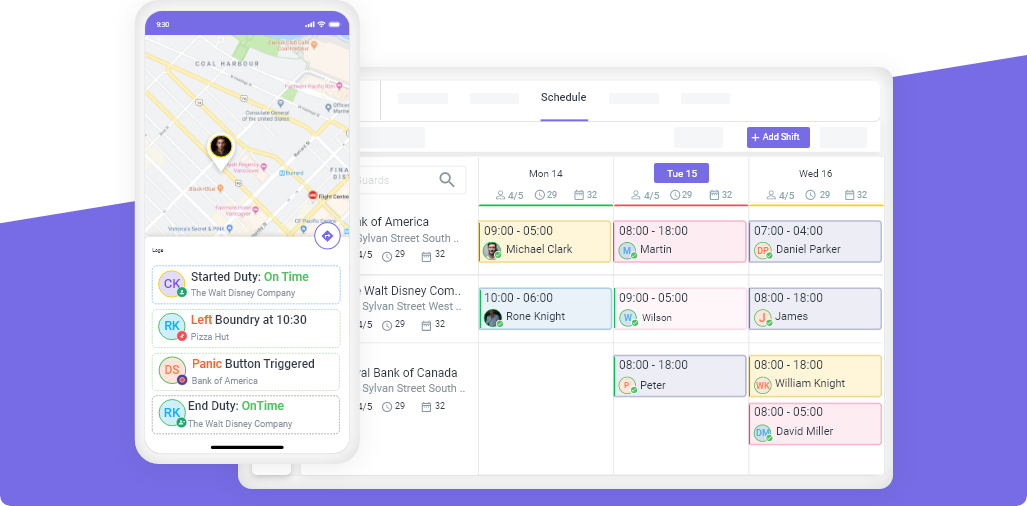

Your guards are not the problem. Your scheduling system is.
Late arrivals. No-shows. Overtime surprises. Double-bookings. Uncovered posts at 2 AM. These do not happen because your security officers are careless. They happen because your scheduling process lets these problems slip through undetected.
Most security companies assign guards to shifts and hope everything goes smoothly. But hope is not a system. The companies that win contracts and keep them are the ones with scheduling rules that catch problems before they cost money.
In this guide, we break down the 10 scheduling rules every security company needs in place. It does not matter which software you use. These principles work everywhere.
Rule 1: Require Shift Confirmations With Responses
The problem: You assign a shift on Monday. The guard sees it, maybe remembers it, maybe does not. Nobody knows the status until shift start time. That is when the client calls asking where the guard is.
The fix: Every shift assignment should require a confirmation response from the guard.
- Guard receives notification with full shift details (site, time, post)
- Guard confirms or declines through the app
- Unconfirmed shifts get flagged to the manager 24 hours before start
- You stop chasing 100% of your team and only deal with the small percentage who have not confirmed
Result: When silence is caught early, no-shows drop. Not because guards changed — but because the system stopped ignoring non-responses.
Rule 2: Make Weekly Hours Visible During Scheduling
The problem: Most security companies discover overtime at the end of the week when payroll hits and profits vanish. Why? Because when they assign shifts, they cannot see how many hours a guard has already worked.
The fix: When you are assigning a shift, total weekly hours should be visible right there — not in a separate report, not after the fact, but in real time while you are making the decision.
| Without Hours Visibility | With Hours Visibility |
|---|---|
| Assign a 10-hour shift to someone already at 35 hours | See the 35 hours immediately, choose someone at 20 hours instead |
| Overtime surprise at payroll | Overtime caught before it happens |
| Uneven workload across team | Balanced distribution across all guards |
Result: You split work fairly, keep your team happy, and catch overtime before it costs you — not after.
Rule 3: Schedule Based on Guard Location, Not Just Availability
The problem: A reliable guard gets assigned a morning shift. He leaves on time. Tries his best. Still arrives late — again. Everyone blames him. But the real issue? He was assigned to a site 45 minutes away. Meanwhile, another guard lives 10 minutes from that site.
The fix: When scheduling, factor in how far each guard lives from the job site. This matters most for:
- Early morning shifts — a 40-minute difference decides whether someone arrives on time
- Multi-site operations — small inefficiencies multiply across dozens of assignments
- Emergency fill-ins — the closest available guard should get the shift
GPS tracking and geofencing helps verify guards are on site, but proximity-based scheduling prevents the problem from happening in the first place.
Result: Late starts drop. Shorter travel means less stress, lower costs, and more reliable attendance.
Rule 4: Enable Automatic Conflict Detection
The problem: A guard gets assigned to two sites at 9 AM. He shows up at one. The other site has nobody. The client calls, furious.
The fix: When you assign a shift, scheduling conflicts should surface instantly — not after you save, not the next day, but right there while you are choosing the person.
The system should tell you: “This guard is already scheduled elsewhere at this time."
Spreadsheets will never warn you about this. Scheduling software like Novagems flags conflicts automatically before you save the schedule.
Result: Double-bookings go to zero without requiring extra effort from your scheduling team.
Rule 5: Track Certifications and Block Unqualified Assignments
The problem: A guard with an expired firearms permit gets scheduled for an armed post. An audit catches it. The fine is $5,000. The client terminates the contract.
The fix: Every license and certification should be tracked with expiry dates. When you try to schedule someone with an expired credential:
- A conflict shows immediately
- The system blocks the assignment until the credential is renewed
- Automated reminders go out 60 days before expiry
This is especially critical in states like California where guard card requirements are strict and BSIS audits are real.
Result: Compliance is built into scheduling — not treated as a separate task that gets forgotten.
Rule 6: Use Targeted Open Shifts for Callouts
The problem: A guard calls in sick at 5 AM. You start making phone calls, working through your contact list. By the time someone agrees, the client has been without security for 2 hours.
The fix: Open shifts should go only to eligible, available guards — filtered by qualifications, location, and availability.
- Set the number of remaining slots (e.g., 1 position available)
- Choose the fill method: first-come-first-pick or manager approval
- Only qualified guards near the site see the notification
- Gap filled in minutes, not hours
Result: The right guard sees it, responds, and either gets it instantly or waits for approval. No wasted time calling through a list.
Rule 7: Set Overtime Threshold Alerts
The problem: Your best guard is reliable and always says yes to extra shifts. By Wednesday he is at 38 hours. You assign him Thursday and Friday without realizing. That is 16 hours of overtime at 1.5x pay — none of it billed to the client.
The fix: Set an alert threshold at 35 hours. When any guard approaches that threshold, the system warns you before you assign the next shift.
| Guard | Current Hours | Next Shift | Alert |
|---|---|---|---|
| R. Santos | 32 | 8 hrs → 40 total | No alert |
| M. Johnson | 36 | 8 hrs → 44 total | Overtime warning |
| T. Chen | 28 | 8 hrs → 36 total | No alert |
Result: You see the overtime coming and redistribute the shift to a guard with fewer hours. The overtime never happens.
Rule 8: Copy and Repeat Recurring Schedules
The problem: Same sites. Same guards. Same times. Week after week. But you rebuild the entire schedule from scratch every single week.
The fix: If you have 30 shifts per week and 80% stay the same, you are recreating 30 shifts when you only need to adjust 6.
- Copy last week’s schedule with one click
- Set repeat rules for recurring shifts (every Monday, Wednesday, Friday)
- Create templates for different week types (standard week, holiday week)
Result: Stable, recurring schedules take minutes, not hours. Those saved hours go back into growing your business.
Rule 9: Publish Schedules With Control
The problem: You create a shift and the guard sees it immediately — even though you are still making changes. They plan around wrong information. You adjust later and nobody knows what is final.
The fix: Use a draft-review-publish workflow:
- Draft: Build and adjust. Guards do not see it yet.
- Review: Check for conflicts, overtime, uncovered posts.
- Publish: Guards get notified with confirmed details.
- Changes after publishing: Guard receives immediate notification.
Result: Guards see only what is confirmed. No confusion. No “I thought I was working Tuesday” problems.
Rule 10: Build a Backup Guard List for Every Region
The problem: When a no-show happens, the speed of your response determines the damage. If it takes 3 hours to find a replacement, the client suffers for 3 hours.
The fix: Maintain a standby list of 3-5 guards per region:
- Prioritize guards who live close to multiple sites
- Include full-time guards with open availability and part-time guards who want extra hours
- Keep the list updated weekly
- When a no-show occurs, send open shift notification to standby list first
Result: Gaps get filled in minutes, not hours. Clients never know there was a problem.
Build the System Once. Protect Your Business Every Day.
| Rule | What It Fixes | Business Impact |
|---|---|---|
| 1. Shift confirmations | No-shows and silent non-responses | Fewer missed shifts |
| 2. Weekly hours visibility | Overtime surprises | Controlled labor costs |
| 3. Location-based scheduling | Late arrivals | Reliable attendance |
| 4. Conflict detection | Double-bookings | Zero scheduling conflicts |
| 5. Certification tracking | Compliance violations | Audit-ready operations |
| 6. Targeted open shifts | Slow callout coverage | Gaps filled in minutes |
| 7. Overtime alerts | Non-billable overtime | Protected margins |
| 8. Recurring schedules | Hours wasted rebuilding | 80% faster scheduling |
| 9. Publish with control | Confusion from draft schedules | Clear communication |
| 10. Backup guard list | Uncovered posts | Professional response |
These 10 rules work regardless of which software you use. But the right security guard scheduling software makes implementing them effortless.
Ready to Put These Rules Into Practice?
Novagems gives you all 10 systems in one platform — scheduling, GPS tracking, overtime alerts, certification tracking, and more — built specifically for security companies.
See Novagems in action
Join 500+ security & cleaning companies that replaced spreadsheets with Novagems.
✓ 14-day free trial · ✓ Free onboarding · ✓ Cancel anytime