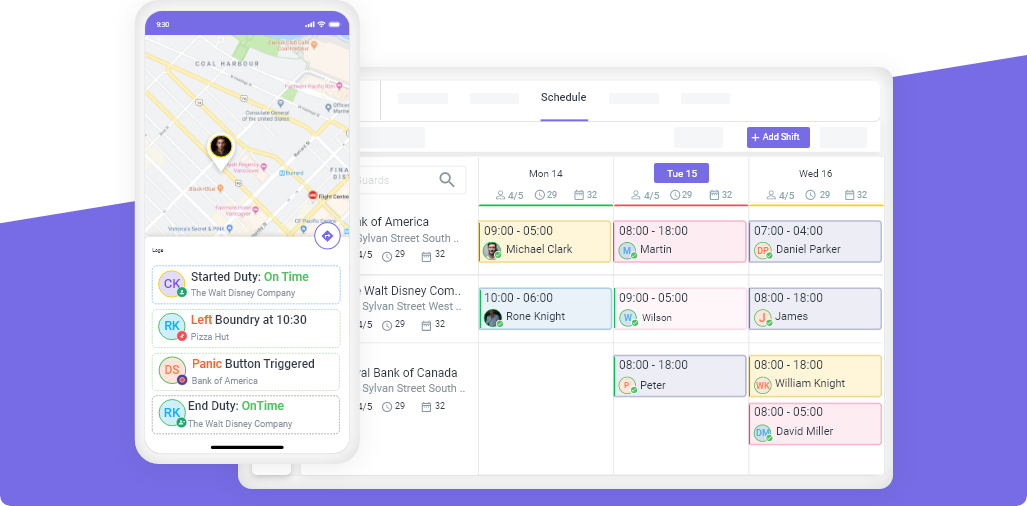
If you are still managing your security company with spreadsheets, WhatsApp groups, and phone calls, you are spending 10+ hours per week on tasks that software handles in minutes. You are also invisible to clients who expect real-time reports, GPS proof of patrols, and professional incident documentation.
The security guard software market has matured significantly. In 2026, there are clear leaders for different company sizes and needs. This guide compares the 5 most widely used platforms, explains what features actually matter, and helps you choose the right one without sitting through 5 sales demos.
What to Look for in Security Guard Software (2026)
Before comparing platforms, understand the features that separate useful software from expensive distractions.
Must-Have Features
| Feature | Why It Matters |
|---|---|
| Real-time GPS tracking | Proves guards are on-site, monitors patrol routes, builds client trust |
| Geofenced clock-in/out | Prevents buddy punching, ensures accurate timesheets |
| Drag-and-drop scheduling | Build weekly schedules in minutes instead of hours |
| Checkpoint/guard tour scanning | NFC or QR code verification that specific patrol points were visited |
| Mobile incident reporting | Guards file reports with photos and GPS stamps from their phone |
| Client portal | Give clients direct access to reports, patrol data, and coverage proof |
| Payroll-ready timesheets | Export accurate hours to your payroll provider without manual calculation |
| Overtime alerts | Get notified before a guard crosses the overtime threshold |
| 24/7 support | Security operations run around the clock, your software support should too |
Nice-to-Have Features
- Embedded payroll (direct deposit + tax filing)
- Custom report branding with your company logo
- Open shift management for last-minute callout coverage
- Guard certification and license tracking
- Mobile patrol route optimization
The 5 Best Security Guard Software Platforms in 2026
1. Novagems — Best All-in-One for SMB Security Companies
Best for: 10-500 guards in the US and Canada
Novagems is designed specifically for small to mid-size security companies that want one platform for scheduling, GPS tracking, incident reporting, and client reporting without enterprise pricing.
Key strengths:
- All features included in one plan, no add-ons or module upsells
- Per-active-user pricing, you don’t pay for guards on leave or off-season
- GPS tracking with geofencing for real-time guard monitoring
- Drag-and-drop scheduling with overtime alerts
- Checkpoint tours with NFC and QR scanning
- Mobile patrol route tracking
- Client portal with automated report delivery
- 24/7 support on all plans
- Operational within 1-2 business days
Considerations:
- No embedded payroll (exports payroll-ready timesheets to your existing provider)
- Best suited for companies under 500 guards
Pricing: Per active user, transparent published pricing. 14-day free trial available.
2. TrackTik — Best for Enterprise Operations
Best for: 500+ guards across multiple countries
TrackTik is the established enterprise platform in the security guard software space. It offers deep analytics, billing integration, and compliance features designed for large, complex operations.
Key strengths:
- Enterprise-grade analytics and workforce intelligence
- Multi-country, multi-language support
- Advanced billing and invoicing features
- Strong brand recognition in the enterprise market
Considerations:
- Enterprise pricing, significantly more expensive than SMB alternatives
- Implementation typically takes weeks, not days
- Designed for enterprise needs, which may feel like more complexity than smaller operations require
- No publicly available free trial
Pricing: Custom enterprise quotes only.
3. Belfry — Best for US Companies Wanting Embedded Payroll
Best for: US-based mid-market security companies that want to eliminate separate payroll software
Belfry is a newer entrant (founded 2022) with strong funding ($20M+) and a differentiated approach: embedded payroll with direct deposit and tax filing built directly into the security management platform.
Key strengths:
- Fully embedded payroll across all 50 US states
- Smart shift matching based on guard qualifications
- Modern user interface and design
- Strong engineering team with rapid feature development
Considerations:
- US only, does not serve Canadian security companies
- No published pricing, requires a sales demo
- No publicly available free trial
- Smaller customer base compared to more established platforms
Pricing: Custom quotes only.
4. GuardsPro — Best for Very Small Operations on a Budget
Best for: 3-15 guards with basic GPS and reporting needs
GuardsPro offers low entry-level pricing that appeals to very small security operations. The base plan covers basic GPS tracking and reporting, with additional features available as add-on modules.
Key strengths:
- Low starting price point ($5/user/month)
- 30-day free trial, the longest trial period among competitors
- 25+ report types for varied reporting needs
- Same-day setup for basic features
Considerations:
- Core features like scheduling, site tours, and payroll export are add-on modules, so the real cost can increase as you scale
- Email-only support, no phone or 24/7 availability
- Multiple reviewers on G2 and Capterra have flagged support responsiveness as an area for improvement
- 3-user minimum billing
Pricing: From $5/user/month + add-on modules. 30-day free trial.
5. Connecteam — Best General Workforce Tool (Not Security-Specific)
Best for: Companies that need basic scheduling and time tracking across multiple industries, not just security
Connecteam is a general workforce management platform used across restaurants, retail, cleaning, and other industries. It is not purpose-built for security but offers solid scheduling and communication features.
Key strengths:
- Clean, intuitive interface
- Good for companies that manage both security and non-security teams
- Affordable for basic scheduling needs
- Strong mobile app experience
Considerations:
- No checkpoint/guard tour scanning
- No security-specific incident reporting
- No client portal for security report delivery
- Not built for the specific needs of security operations
Pricing: Free plan for up to 10 users, paid plans from $29/month.
Feature Comparison Table
| Feature | Novagems | TrackTik | Belfry | GuardsPro | Connecteam |
|---|---|---|---|---|---|
| GPS tracking | ✓ | ✓ | ✓ | ✓ (higher plans) | ✓ |
| Geofenced clock-in | ✓ | ✓ | ✓ | ✓ | ✓ |
| Checkpoint tours | ✓ | ✓ | ✓ | ✓ (add-on) | ✗ |
| Scheduling | ✓ | ✓ | ✓ | ✓ (add-on) | ✓ |
| Incident reporting | ✓ | ✓ | ✓ | ✓ | ✗ |
| Client portal | ✓ | ✓ | ✓ | ✓ | ✗ |
| Embedded payroll | ✗ | ✗ | ✓ | ✗ | ✗ |
| Public pricing | ✓ | ✗ | ✗ | ✓ | ✓ |
| Free trial | ✓ 14 days | ✗ | ✗ | ✓ 30 days | ✓ |
| 24/7 support | ✓ | Varies | ✗ | ✗ | ✗ |
| Canada coverage | ✓ | ✓ | ✗ | ✓ | ✓ |
| Setup time | 1-2 days | Weeks | Varies | Same day | Same day |
| Security-specific | ✓ | ✓ | ✓ | ✓ | ✗ |
How to Choose the Right Platform
Choose Novagems if:
- You have 10-500 guards in the US or Canada
- You want all features in one platform without add-on fees
- You need 24/7 support for round-the-clock operations
- You want to be operational within 1-2 days
- You want transparent, per-active-user pricing
Choose TrackTik if:
- You have 500+ guards across multiple countries
- You have a dedicated IT team and budget for enterprise implementation
- You need advanced compliance and billing features
Choose Belfry if:
- You are US-only and eliminating separate payroll software is your top priority
- You are comfortable with a newer platform and custom pricing
Choose GuardsPro if:
- You have very basic needs and 3-15 guards
- You want the lowest possible entry price
- You have strong internal admin support
Choose Connecteam if:
- You manage both security and non-security teams
- You only need basic scheduling and communication, not security-specific features
What It Costs to NOT Use Software
The real question is not “can I afford security guard software?” It is “can I afford not to use it?”
| Problem | Annual Cost Without Software |
|---|---|
| Scheduling errors (5 hrs/week wasted) | $13,000+ |
| No-shows without early detection | $15,000-$50,000 |
| Overtime surprises (non-billable) | $20,000-$80,000 |
| Lost contracts from poor reporting | $24,000-$120,000 |
| Payroll disputes and corrections | $5,000-$15,000 |
| Total potential annual cost | $77,000-$278,000 |
Compare that to the cost of software ($6-15/user/month) and the math is clear.
Getting Started
Most security companies are fully operational on new software within 1-2 business days. The typical migration process:
- Export your current data (guard profiles, sites, schedules) as CSV
- Import to the new platform with vendor assistance
- Configure sites and checkpoints (NFC tags or QR codes at patrol points)
- Train your team (guards need 1-2 hours of orientation)
- Go live and start seeing results immediately
Ready to see the difference? Start your free 14-day trial with Novagems and have your scheduling, GPS tracking, and client reporting live before your next payroll run.
See Novagems in action
Join 500+ security & cleaning companies that replaced spreadsheets with Novagems.
✓ 14-day free trial · ✓ Free onboarding · ✓ Cancel anytime