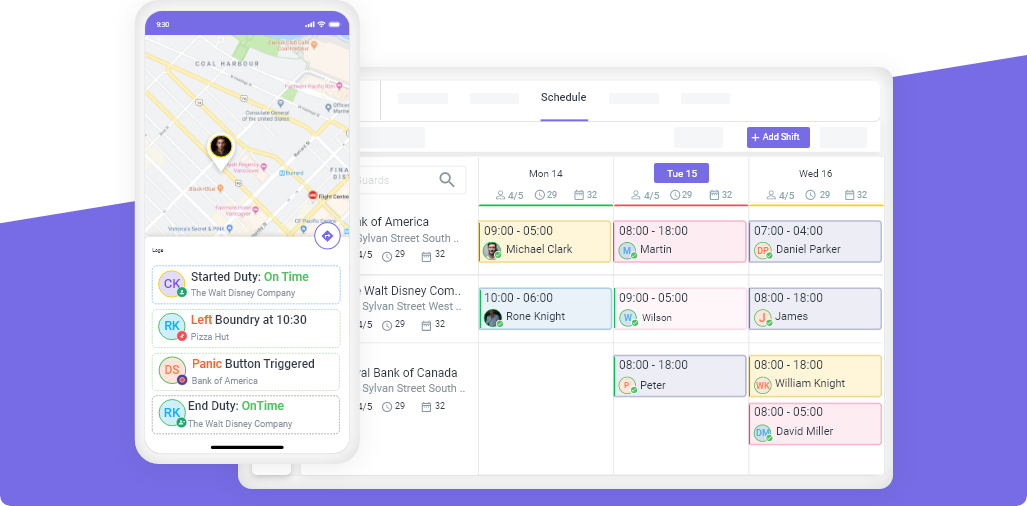
GPS tracking for security guards uses smartphone-based location technology to monitor guard positions in real-time, verify site presence through geofencing, track patrol routes, and generate proof-of-service reports for clients. A complete GPS tracking system for security companies includes real-time location maps, geofenced clock-in/out, patrol route recording, checkpoint scanning (NFC or QR), missed clock-in alerts, and client portal integration. The average security company implementing GPS tracking reports 25-40% reduction in non-billable overtime and 15-25% improvement in client retention.
If you run a security company and you cannot answer the question “Where are all my guards right now?” in under 10 seconds, you have a visibility problem that is costing you money, contracts, and credibility.
Phone check-ins worked when the industry was smaller. Today, with guard turnover averaging 100-200% annually (Bureau of Labor Statistics, 2024) and clients demanding real-time accountability, GPS tracking is not optional. It is the baseline expectation.
This guide covers how GPS tracking works for security operations, the measurable ROI it delivers, the legal requirements you need to know, how to implement it step by step, and how to choose the right system.
How GPS Tracking Works for Security Guards
GPS tracking for security guards is fundamentally different from fleet tracking or delivery logistics. Security-specific GPS tracking is designed around three core needs: proving guards are on-site, verifying patrol routes were completed, and generating documentation that clients can review.
The Technology Stack
| Component | What It Does | How It Works |
|---|---|---|
| Guard’s smartphone | Captures GPS coordinates | Security app runs in the background during active shifts |
| Cloud platform | Stores and processes location data | Receives location pings every 30-60 seconds |
| Manager dashboard | Displays real-time guard locations | Live map with guard positions, patrol paths, and alerts |
| Client portal | Shares patrol data with clients | Automated reports with routes, timestamps, and coverage proof |
The Daily Workflow
For guards:
- Open the security app and clock in at the start of shift. The app records GPS location — if geofencing is enabled, clock-in is only possible within the site perimeter.
- Complete patrol routes. The app tracks the path walked or driven, recording coordinates continuously.
- Scan NFC tags or QR codes at designated checkpoints. Each scan is GPS-stamped and time-stamped.
- Report any incidents through the app with photos and GPS location attached automatically.
- Clock out at shift end. The app stops tracking.
For managers:
- Open the live map to see every on-duty guard across all sites simultaneously.
- Receive automatic alerts when a guard has not clocked in within 5 minutes of shift start.
- Click any guard to see their current location, assigned site, shift details, and patrol progress.
- Review completed patrol routes with timestamps after each shift.
- Generate and share patrol reports with clients automatically.
The entire system runs on the guards’ existing smartphones. No additional hardware is required beyond NFC tags at checkpoint locations (typically $0.50-$2.00 each).
The Business Case: GPS Tracking ROI for Security Companies
GPS tracking is not an expense. It is an investment that pays for itself within the first month for most security companies.
Quantified ROI by Company Size
| Metric | 25 Guards | 50 Guards | 100 Guards |
|---|---|---|---|
| Annual overtime savings (25-40% reduction) | $15,000-$30,000 | $40,000-$80,000 | $90,000-$180,000 |
| No-show cost avoidance | $8,000-$15,000 | $18,000-$35,000 | $40,000-$75,000 |
| Client retention value (15-25% improvement) | $24,000-$60,000 | $50,000-$120,000 | $100,000-$250,000 |
| Payroll dispute reduction | $3,000-$5,000 | $5,000-$12,000 | $12,000-$25,000 |
| Total annual value | $50,000-$110,000 | $113,000-$247,000 | $242,000-$530,000 |
| Software cost (at $10/user/month) | $3,000 | $6,000 | $12,000 |
| ROI | 16-36x | 18-41x | 20-44x |
How Each Savings Category Works
Overtime reduction (25-40%): Without GPS-verified clock-in/out, guards frequently clock in early and clock out late — adding 10-20 minutes per shift. With geofenced clock-in, time records are precise. For a 50-guard company, eliminating just 15 minutes of daily time padding saves $40,000+ per year.
No-show response speed: Without GPS tracking, you learn about a no-show when the client calls — typically 1-3 hours into the shift. With GPS clock-in alerts, you know within 5 minutes. Faster response means less lost billable time and fewer angry clients.
Client retention: Clients stay with security companies that provide transparency. GPS patrol reports show exactly which areas were covered, when, and by whom. Multiple industry surveys show that security companies providing digital patrol reports retain clients 15-25% longer than those using manual reporting.
Payroll dispute elimination: GPS records settle timesheet disputes instantly. No more “he said, she said” arguments about hours worked. The data is objective.
GPS Tracking vs. Geofencing vs. Checkpoint Scanning
These three technologies are often confused. Modern security platforms use all three together, but they serve different purposes.
| Technology | What It Answers | How It Works | Accuracy |
|---|---|---|---|
| GPS tracking | “Where is the guard right now?” | Continuous location recording via smartphone GPS | 3-5 meters outdoors |
| Geofencing | “Did the guard clock in at the right location?” | Virtual boundary around a site; alerts if crossed | Configurable radius (50-500 meters) |
| Checkpoint scanning | “Did the guard visit this specific spot?” | NFC tag or QR code scan at patrol points | Exact — guard must physically touch/scan the tag |
When to Use Each
- GPS tracking alone is sufficient for mobile patrol — tracking vehicles and officers as they move between sites.
- Geofencing is essential for any site with clock-in/out — it prevents off-site clock-ins (buddy punching).
- Checkpoint scanning is required for guard tour verification — GPS cannot prove a guard entered a specific stairwell or checked a specific door.
Best practice: Use all three. GPS tracking provides the big picture. Geofencing prevents time fraud. Checkpoint scanning verifies patrol completion.
Novagems combines all three in a single platform alongside scheduling, incident reporting, and payroll timesheets.
Legal Requirements: US and Canada
GPS tracking of employees is legal in both the US and Canada, but it comes with disclosure and consent requirements that vary by jurisdiction.
United States
Federal law: No federal law specifically prohibits employer GPS tracking during work hours. The Electronic Communications Privacy Act (ECPA) permits monitoring with employee notice.
State-specific requirements:
| State | Requirement | Key Detail |
|---|---|---|
| California | Written disclosure recommended | Cal. Labor Code allows monitoring with notice; Cal. Penal Code § 637.7 prohibits tracking without consent |
| Connecticut | Written notice required | Conn. Gen. Stat. § 31-48d requires written notice before electronic monitoring |
| New York | Written notice required | N.Y. Civ. Rights Law § 52-c requires notice of electronic monitoring |
| Delaware | Written notice required | Must provide notice of monitoring to employees |
| Texas | No specific statute | General consent principles apply; written notice recommended |
| Florida | No specific statute | Monitoring permitted with notice; consent recommended |
Best practice for all US states: Provide written disclosure at hire, include GPS tracking in your employee handbook, have guards sign an acknowledgment, and only track during active shifts.
Canada
Federal (PIPEDA): Employers may track employees with GPS during work hours if there is a legitimate business purpose, employees are notified, and the tracking is proportionate to the need.
Provincial requirements:
| Province | Requirement |
|---|---|
| Ontario | Working for Workers Act (2022) requires electronic monitoring policies for employers with 25+ employees |
| Alberta | PIPA requires notice and consent |
| British Columbia | PIPA requires notice and appropriate purpose |
| Quebec | Privacy Act requires notice and proportionality |
Best practice for all Canadian provinces: Document the business purpose (client accountability, safety, operational efficiency), notify employees in writing, track only during shifts, and include the policy in your employee handbook.
Off-Duty Tracking
Never track employees when they are off duty. This applies universally. The security app should stop tracking the moment a guard clocks out. If your system does not enforce this automatically, switch systems.
How to Implement GPS Tracking: Step-by-Step
Step 1: Define Your Requirements (Day 1)
Before choosing a platform, document what you need:
- How many guards do you need to track?
- How many sites?
- Do you need geofenced clock-in?
- Do you need checkpoint/guard tour verification?
- Do clients require patrol reports?
- What is your budget per guard per month?
- Do guards use company phones or personal devices?
Step 2: Choose a Platform (Day 1-3)
| Criteria | What to Look For |
|---|---|
| Security-specific features | Geofencing, checkpoint scanning, patrol routes, incident reporting |
| Mobile app quality | Works on both iOS and Android, low battery drain, offline mode |
| Client portal | Share reports with clients directly |
| Integration | Scheduling, timesheets, and payroll in the same platform |
| Support | 24/7 availability (security operations are around the clock) |
| Pricing | Per-active-user pricing (do not pay for guards on leave) |
Step 3: Set Up Sites and Geofences (Day 3-4)
For each site:
- Add the site address to the platform
- Set the geofence radius (typically 100-300 meters depending on site size)
- Place NFC tags or QR codes at checkpoint locations (entrances, stairwells, parking areas, perimeter gates)
- Define patrol routes and expected completion times
- Configure client reporting preferences
Step 4: Create Your GPS Tracking Policy (Day 4-5)
Write a one-page policy that covers:
- What is tracked (location during active shifts only)
- When tracking starts and stops (clock-in to clock-out)
- Who can view the data (managers, supervisors, clients)
- How data is stored and how long it is retained
- What happens if a guard disables location services during a shift
- Employee acknowledgment signature
Step 5: Train Your Team (Day 5-7)
For guards (1-2 hours):
- How to install and log into the app
- How to clock in and clock out
- How to scan checkpoints
- How to submit incident reports
- What the GPS tracking policy means for them
- Common questions and concerns
For managers (2-3 hours):
- How to read the live map dashboard
- How to set up and adjust geofences
- How to respond to alerts (missed clock-in, geofence violations)
- How to generate and share client reports
- How to use GPS data for scheduling decisions
Step 6: Go Live and Monitor (Day 7+)
Start with one or two sites. Monitor for a week. Fix any issues with geofence radius (too tight causes false alerts, too loose allows off-site clock-ins). Then roll out to remaining sites.
Common first-week issues:
- Geofence too small — guards on the edge of the property get rejected. Expand by 50 meters.
- Guards forgetting to clock in via the app — send daily reminders for the first week
- Low phone battery complaints — recommend portable chargers for 12+ hour shifts
- Indoor GPS drift — rely on NFC checkpoint scanning for indoor patrol verification
How Guards React (and How to Handle Pushback)
The number one concern guards have about GPS tracking is privacy. This is predictable and manageable.
What guards worry about:
- “Are you tracking me when I’m off duty?”
- “Is this because you don’t trust me?”
- “Will I get in trouble for every bathroom break?”
How to address it:
| Concern | Response |
|---|---|
| Off-duty tracking | “The app only tracks during your active shift. When you clock out, tracking stops completely.” |
| Trust | “This protects you as much as the company. If a client disputes your hours or claims you missed a patrol, the GPS data proves you were there.” |
| Micromanagement | “We are not watching every step. We are building documentation that protects you, satisfies clients, and helps us schedule better.” |
In practice, most guards adapt within 1-2 shifts. The guards who are doing their job correctly quickly realize that GPS tracking validates their work. The ones who resist often have a reason.
Choosing the Right GPS Tracking System
What to Compare
| Feature | Must Have | Nice to Have |
|---|---|---|
| Real-time location map | ✓ | |
| Geofenced clock-in/out | ✓ | |
| Patrol route history | ✓ | |
| NFC/QR checkpoint scanning | ✓ | |
| Missed clock-in alerts | ✓ | |
| Offline mode | ✓ | |
| Client portal | ✓ | |
| Scheduling integration | ✓ | |
| Incident reporting | ✓ | |
| Payroll-ready timesheets | ✓ | |
| 24/7 support | ✓ |
The strongest choice is a platform that includes GPS tracking as part of a complete workforce management system — not a standalone tracker bolted onto other tools.
Red Flags
- Requires separate hardware (GPS devices, dedicated trackers) — smartphone-based is simpler and cheaper
- No geofencing — GPS tracking without geofencing does not prevent buddy punching
- No client portal — you will manually create patrol reports
- No offline mode — gaps in tracking data when signal drops
- Per-device pricing instead of per-user — costs scale faster
GPS Tracking Metrics to Monitor
Once GPS tracking is live, track these metrics monthly to measure impact:
| Metric | What to Track | Target |
|---|---|---|
| Clock-in accuracy | % of shifts with on-time, on-site clock-in | >95% |
| Geofence violations | Off-site clock-in attempts per week | <2% of total clock-ins |
| Patrol completion rate | % of checkpoint scans completed on schedule | >98% |
| No-show detection time | Minutes from shift start to no-show alert | <5 minutes |
| Overtime from time padding | Hours of early clock-in/late clock-out per week | Decreasing trend |
| Client report delivery | % of clients receiving automated reports | 100% |
Getting Started
Most security companies are fully operational with GPS tracking within 5-7 business days. The typical timeline:
- Day 1-2: Choose platform, set up account
- Day 3-4: Configure sites, geofences, and checkpoints
- Day 5: Write and distribute GPS tracking policy
- Day 6-7: Train guards and managers
- Day 7+: Go live at first site, expand weekly
Ready to see GPS tracking in action? Start a free 14-day trial with Novagems and have real-time guard tracking, geofenced clock-in, and client reporting live within a week.
See Novagems in action
Join 500+ security & cleaning companies that replaced spreadsheets with Novagems.
✓ 14-day free trial · ✓ Free onboarding · ✓ Cancel anytime