What Is a Guard Tracking System?
A guard tracking system is software that monitors the real-time location, patrol routes, and checkpoint activity of security guards using GPS, NFC tags, or QR codes. Security managers see a live map of where every guard is, receive instant alerts when patrols are missed or guards leave assigned areas, and access a timestamped log of every checkpoint scan and incident report.
The core problem it solves: without a tracking system, a security company has no reliable way to prove guards were where they were supposed to be. A client can’t verify patrols happened. A manager can’t confirm checkpoints were hit. And when something goes wrong, there’s no documentation trail.
According to ASIS International, security companies that use digital patrol management systems report 30-50% fewer missed patrols and significantly stronger client retention rates compared to companies using paper-based or phone-based reporting.
How Guard Tracking Works: GPS vs NFC vs QR
Modern guard tracking systems use one or more of three technologies. Each has different strengths:
| Technology | How It Works | Best For | Limitation |
|---|---|---|---|
| GPS Tracking | Guard’s smartphone transmits location every 30-60 seconds | Continuous patrol monitoring, geofencing | Requires mobile data; GPS can drift indoors |
| NFC Checkpoint Scanning | Guard taps phone to NFC tag at each checkpoint | Proving physical presence at specific locations | Only captures presence at tagged points, not movement between them |
| QR Code Scanning | Guard scans QR code posted at each checkpoint | Low-cost checkpoint verification | Can be photographed and scanned remotely (spoofable without GPS cross-check) |
Best practice: Use GPS for continuous patrol monitoring and NFC or QR for checkpoint verification. The combination gives you both real-time location awareness and proof of presence at critical points.
5 Core Features to Look For
1. Real-Time GPS Dashboard
Managers should be able to open the dashboard and immediately see where every guard is on a live map, not a 10-minute-delayed refresh. Look for platforms that update location every 30-60 seconds and show movement trails so you can see the patrol route taken, not just the current location.
2. Geofencing and Zone Alerts
Geofencing lets you define a digital boundary around a site or patrol area. If a guard leaves that zone or fails to enter it for their shift, you get an immediate alert. This feature alone eliminates the most common client complaint in security: “Your guard wasn’t on site.”
3. Checkpoint Verification
GPS tells you where a guard is. Checkpoint scanning tells you they were physically present at the exact location. Configure required checkpoints for each patrol, and the system will alert you if any are missed or completed out of order.
4. Automated Incident Reports with Photos
Guards should be able to log incidents directly from their phone, attach photos or videos, and submit in real time. The best systems automatically timestamp and GPS-tag every report, creating a defensible record if a client or legal matter arises.
5. Client Reporting
Transparency is one of the most powerful retention tools in security. Giving clients direct access to patrol reports and checkpoint logs removes the friction of weekly reporting emails and builds trust that’s hard for competitors to undercut.
The Business Case: What Guard Tracking Delivers
Security companies that implement digital guard tracking systems report consistent results across operations:
| Metric | Without Tracking | With Tracking |
|---|---|---|
| Missed patrol detection | Discovered when client calls | Alerted in real time |
| Checkpoint verification | Guard’s word only | GPS + NFC timestamped log |
| Incident report quality | Handwritten, often incomplete | Photo-attached, GPS-tagged, timestamped |
| Client reporting time | 2-4 hours/week per contract | Auto-generated in seconds |
| Liability disputes | Difficult to defend | Full audit trail available |
| Guard accountability | Low (no observable monitoring) | High (guards know activity is logged) |
Research from the security workforce management industry indicates that guard tracking software reduces administrative time for field supervisors by an average of 40%, primarily by eliminating manual patrol log compilation and phone-based check-in procedures.
Additionally, the “Hawthorne Effect” is well-documented in security operations: guards who know their routes and checkpoints are being monitored complete patrols more consistently and log more thorough incident reports.
How Novagems Guard Tracking Works
Novagems integrates GPS tracking, geofencing, and checkpoint scanning into a single platform designed specifically for security companies.
What guards do:
- Open the Novagems mobile app at shift start
- GPS tracking begins automatically, no manual check-in required
- Scan NFC tags or QR codes at each checkpoint
- Log incidents with photos directly in the app
- Clock out when the shift ends
What managers see:
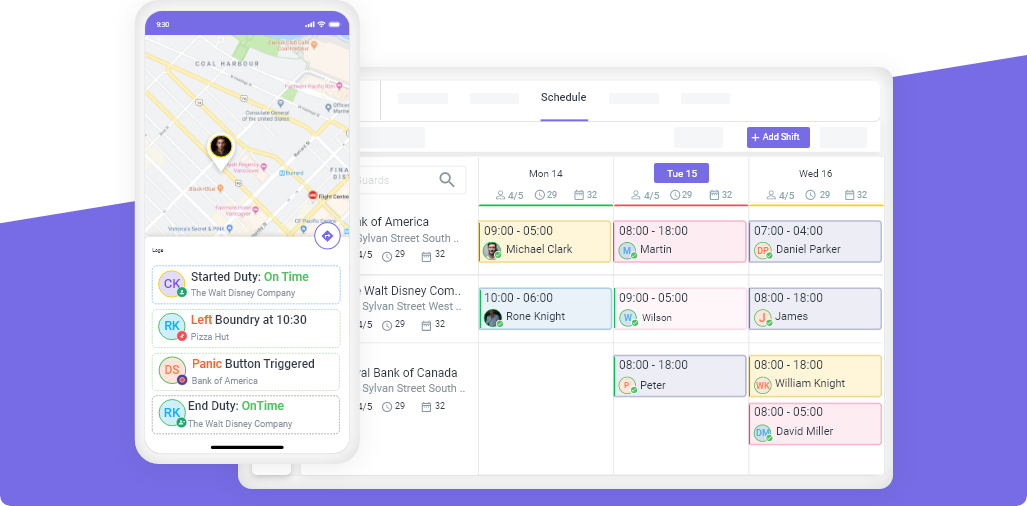
- Live map showing all active guards and their current locations
- Real-time alerts if a guard misses a checkpoint or leaves a geofenced area
- Timestamped patrol history and checkpoint scan logs
- Auto-generated activity reports ready to share with clients
What clients get:
- Access to a client reporting with their site’s patrol reports
- Transparent checkpoint completion logs
- Professional PDF reports (branded to your company)
Guard Tracking System: Frequently Asked Questions
What is a guard tracking system?
A guard tracking system is software that uses GPS, NFC tags, or QR codes to monitor the real-time location, patrol routes, and checkpoint activity of security guards. It gives security managers live visibility into where guards are, whether patrols are being completed, and alerts when guards deviate from their assigned routes.
How does GPS guard tracking work?
Guards carry a smartphone running the security guard app. The app transmits GPS coordinates to a cloud dashboard at regular intervals. Managers see live locations on a map, receive alerts if a guard leaves a designated zone (geofencing), and get notifications if a checkpoint is missed or a patrol is overdue.
What is the difference between GPS tracking and NFC checkpoint scanning?
GPS tracking shows continuous location and movement in real time. NFC checkpoint scanning verifies a guard was physically present at a specific location at a specific time. Best-in-class systems use both: GPS for continuous monitoring and NFC/QR for checkpoint verification.
How much does a guard tracking system cost?
Most guard tracking systems cost between $3 and $12 per guard per month, billed annually. Enterprise platforms with advanced analytics and client reporting typically start at $8-$15 per user per month. Novagems charges per active user only; you don’t pay for guards who aren’t working.
Can a guard tracking system reduce liability for security companies?
Yes. A guard tracking system creates a timestamped, GPS-verified record of every patrol, checkpoint scan, and incident report. If a client disputes whether a guard was on-site, or if a legal claim arises from an incident, this log serves as documentary evidence. Companies using digital tracking systems report significantly fewer liability disputes.
See how Novagems guard tracking works →
Further Reading
- Types of Security Guard Services, pillar guide covering all 12 security service categories
- How to Price Security Guard Contracts, bill rates, margins, and contract pricing formulas
- Workforce Management for Security Companies, operations platform for security firms
- GPS Tracking and Geofencing, verified patrols and real-time guard location
- Start a Free 14-Day Trial, cancel anytime
See Novagems in action
Join 500+ security & cleaning companies that replaced spreadsheets with Novagems.
✓ 14-day free trial · ✓ Free onboarding · ✓ Cancel anytime