The average no-show rate for security guard companies is 5-15%, and each no-show costs between $150 and $800 in lost billable hours, emergency replacement premiums, and management time. The 8 most effective strategies to reduce guard no-shows are: mandatory shift confirmations, automated reminders, GPS-verified clock-in, standby guard pools, point-based accountability systems, root cause tracking, schedule stability, and real-time missed-clock-in alerts. Companies implementing these strategies typically reduce no-show rates by 40-60%.
A guard does not show up for a Monday morning shift at a commercial property in Dallas. The client calls at 6:15 AM asking where the guard is. The operations manager starts making phone calls, trying to find someone who can cover. By the time a replacement arrives at 8:30 AM, the client has been without security for over two hours. The next day, the client asks for a meeting — not to discuss the incident, but to discuss whether they want to continue the contract.
This is not a rare scenario. It happens every week at security companies across North America, and the damage goes far beyond the cost of one missed shift.
The Real Cost of No-Shows for Security Companies
No-shows are not just an inconvenience. They are a compounding financial problem.
Here is what a single no-show actually costs:
| Cost Component | Amount |
|---|---|
| Lost billable hours (avg 4 hrs until replacement) | $120-$200 |
| Emergency replacement premium (1.5x-2x rate) | $80-$160 |
| Manager time spent finding coverage | $50-$100 |
| Client relationship damage | Hard to quantify |
| Potential contract loss | $2,000-$10,000+/month |
| Total per incident | $250-$460+ |
Now multiply that by frequency. A 50-guard company with a 10% weekly no-show rate experiences roughly 5 no-shows per week. That is 260 no-shows per year, costing $65,000-$120,000 in direct costs alone, before accounting for lost contracts.
Why Security Guards Don’t Show Up (Root Causes)
Before you can fix no-shows, you need to understand why they happen. In our experience working with 500+ security companies, the reasons fall into predictable categories:
Scheduling issues (40% of no-shows)
- Guard was not aware of the shift (poor communication)
- Schedule changed and the guard was not notified
- Guard was double-booked and chose the other site
- Shift was too far from the guard’s home
Personal reasons (30%)
- Illness or family emergency (legitimate)
- Transportation problems
- Childcare issues
- Second job conflict
Disengagement (20%)
- Guard does not feel valued or accountable
- No consequences for previous no-shows
- Poor relationship with site supervisor
- Low pay relative to alternatives
System failures (10%)
- Guard never confirmed the shift
- No reminder was sent
- Manager forgot to assign the shift
- Miscommunication about start time
Notice that 50% of no-shows, scheduling issues and system failures, are entirely preventable with better processes and technology. The other 50% can be significantly reduced with the right policies.
Strategy 1: Require Shift Confirmations 24 Hours Before
The single highest-impact change you can make. When you assign a shift, the guard must confirm they will attend.
How it works:
- Guard receives shift notification with full details (site, time, post)
- Guard taps “Confirm” or “Decline” in the app
- Unconfirmed shifts get flagged to the manager 24 hours before start
- Manager reassigns only the flagged shifts, not the entire schedule
This turns a reactive process (finding out at shift start) into a proactive one (knowing 24 hours ahead). You go from managing 100% of your guards to managing only the 5-10% who have not confirmed.
Strategy 2: Set Up Automated Reminders (24hr + 2hr)
Human memory is unreliable. Guards who confirmed on Monday may genuinely forget about a Wednesday night shift.
Send two automated reminders:
- 24 hours before: Full shift details with confirm/decline option
- 2 hours before: Quick reminder with site address and start time
The 2-hour reminder catches the guards who confirmed but might have forgotten. It also gives you a 2-hour window to find a replacement if someone suddenly cannot make it.
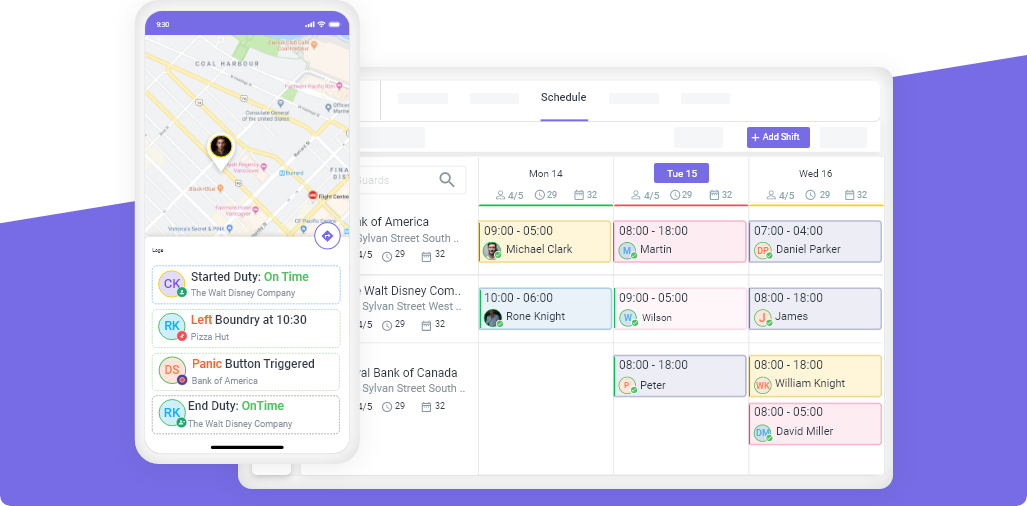
Scheduling software like Novagems automates both reminders. No manual texts, no phone calls, no hoping the guard remembers.
Strategy 3: Build a Backup Guard List for Every Site
When a no-show happens, the speed of your response determines the damage. If it takes 3 hours to find a replacement, the client suffers for 3 hours.
Build a standby list:
- Identify 3-5 guards per region who are available for last-minute shifts
- Prioritize guards who live close to multiple sites
- Include both full-time guards with open availability and part-time guards who want extra hours
- Keep the list updated weekly
When a no-show occurs, send an open shift notification to the standby list. First qualified responder gets the shift. This fills gaps in minutes, not hours.
Strategy 4: Use GPS-Verified Clock-In to Catch Late Arrivals Early
A no-show and a late arrival cause the same problem for the client: there is no guard on site when there should be.
GPS-verified clock-in catches both:
- If a guard has not clocked in within 15 minutes of shift start, an alert fires
- The manager sees it immediately and can start the replacement process
- No more waiting until the client calls to discover the problem
David, who manages 120 guards across 15 sites in Southern California, reduced his response time to no-shows from 2.5 hours to 35 minutes by implementing GPS clock-in alerts. The system tells him immediately when someone has not shown up, instead of waiting for a phone call.
Strategy 5: Track No-Show Patterns Per Guard
Not all no-shows are equal. A guard who no-shows once in six months is different from a guard who no-shows every other Monday.
Track patterns:
- Frequency: How many no-shows per guard in the last 90 days?
- Timing: Which days and shifts see the most no-shows?
- Sites: Do certain sites have higher no-show rates?
- Reasons: Are the reasons legitimate or pattern-based?
When you see that 80% of your no-shows come from 15% of your guards, you know exactly where to focus your attention. Some need coaching. Some need consequences. Some need to be replaced.
Strategy 6: Create a Clear No-Show Policy With Consequences
Guards need to know what happens when they do not show up. A clear policy, communicated during onboarding and reinforced consistently, sets expectations.
Sample no-show policy:
| Offense | Consequence |
|---|---|
| 1st unexcused no-show | Verbal warning, documented |
| 2nd unexcused no-show (within 90 days) | Written warning, loss of preferred shift priority |
| 3rd unexcused no-show (within 90 days) | Termination |
| Excused absence (with 4+ hours notice) | No penalty, documentation only |
| Pattern of last-minute cancellations | Performance review |
Important: Distinguish between unexcused no-shows (no contact, no reason) and excused absences (guard called ahead with a valid reason). Punishing legitimate emergencies destroys trust. Ignoring habitual no-shows destroys your business.
Strategy 7: Schedule Based on Proximity to Job Site
A guard who lives 45 minutes from a site is statistically more likely to be late or no-show than a guard who lives 10 minutes away. Traffic, weather, and transportation issues multiply with distance.
When assigning shifts, factor in:
- Guard’s home address relative to the site
- Public transit availability for guards without vehicles
- Travel time during the specific shift start time (6 AM traffic is different from 6 PM traffic)
This does not mean you can only assign local guards. It means you prioritize proximity for early morning shifts and sites with chronic no-show problems.
Strategy 8: Offer Incentives for Perfect Attendance
Consequences reduce bad behavior. Incentives encourage good behavior. You need both.
Effective incentives:
- Monthly bonus for zero no-shows ($50-$100)
- Priority access to preferred shifts and sites
- First pick on overtime and holiday shifts (higher pay)
- Public recognition (guard of the month)
- Annual attendance bonus
The cost of a $100 monthly bonus for perfect attendance is far less than the cost of replacing no-shows. If a bonus program prevents even one contract loss, it pays for itself many times over.
How Technology Eliminates Most No-Show Problems
Every strategy above works better with the right technology. Here is how the pieces connect:
- Shift confirmations and reminders are automated, not manual
- GPS-verified clock-in catches no-shows in real time, not hours later
- Alerts and notifications go to managers immediately when a guard has not clocked in
- Open shift notifications go to backup guards automatically
- Pattern tracking shows you which guards are reliable and which are not
- Proximity scheduling assigns guards based on distance to site
Companies using workforce management software report 40-60% reduction in no-shows within the first 90 days. The technology does not eliminate the human element. It eliminates the system failures that cause half of all no-shows.
Building a No-Show Response Playbook
Even with all 8 strategies in place, some no-shows will happen. Have a response playbook:
Minute 0-5: Alert fires that guard has not clocked in. Manager receives notification.
Minute 5-15: Manager contacts the guard directly. If no response, activate backup plan.
Minute 15-30: Open shift notification sent to standby list. First qualified responder assigned.
Minute 30-60: Replacement guard en route. Client notified with ETA.
After shift: Document the no-show. Update the guard’s record. Trigger the appropriate consequence from your no-show policy.
The difference between a company that loses contracts to no-shows and one that does not is not the absence of no-shows. It is the speed and professionalism of the response.
Start Reducing No-Shows This Week
You do not need to implement all 8 strategies at once. Start with the highest-impact changes:
- This week: Set up shift confirmations and 24-hour reminders
- Next week: Build your standby guard list for every region
- This month: Implement your no-show policy and communicate it to all guards
- Ongoing: Track patterns and adjust
Ready to automate shift confirmations, GPS clock-in alerts, and backup guard notifications? Start your free 14-day trial with Novagems and see how much time you save in your first week.
Further Reading
- Types of Security Guard Services — pillar guide covering all 12 security service categories
- How to Price Security Guard Contracts — bill rates, margins, and contract pricing formulas
- Workforce Management for Security Companies — operations platform for security firms
- GPS Tracking and Geofencing — verified patrols and real-time guard location
- Start a Free 14-Day Trial — cancel anytime
See Novagems in action
Join 500+ security & cleaning companies that replaced spreadsheets with Novagems.
✓ 14-day free trial · ✓ Free onboarding · ✓ Cancel anytime