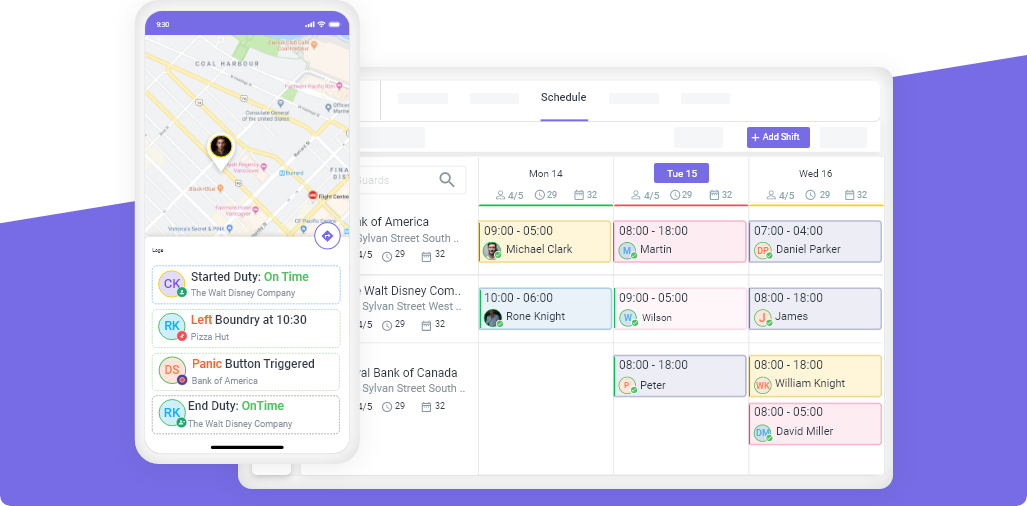
A security guard patrol log is a chronological record of every patrol round completed during a shift, documenting the time, route, checkpoints visited, observations, and any incidents discovered. Patrol logs serve as proof of service for clients, evidence in legal proceedings, operational data for managers, and accountability documentation for guards. Professional patrol logs are the difference between “we patrolled your property” and “here is the time-stamped, GPS-verified evidence of every patrol.”
Why Patrol Logs Matter
Every security client will eventually ask: “Can you prove your guards actually patrolled my property?”
Without patrol logs, the answer is “trust us.” With patrol logs, the answer is documented evidence.
For Clients
- Proof of service — timestamps showing exactly when each area was checked
- Accountability — documentation that contract requirements are being met
- Incident history — chronological record if something goes wrong
- Contract justification — evidence that supports the security investment
For Security Companies
- Client retention — professional reporting keeps contracts active
- Legal protection — documented patrols protect against liability claims
- Guard accountability — managers can verify patrol compliance
- Operational improvement — patterns in logs reveal security gaps
For Legal Purposes
- Evidence in court — patrol logs are admissible documentation
- Insurance claims — prove coverage was in place when an incident occurred
- Compliance audits — demonstrate adherence to contract terms
- Regulatory requirements — some jurisdictions require documented patrols
What to Include in a Patrol Log
Per-Shift Header
| Field | Example |
|---|---|
| Date | April 15, 2026 |
| Site name | Meridian Office Complex |
| Guard name | J. Rodriguez |
| Badge/ID number | NG-4471 |
| Shift start | 6:00 PM |
| Shift end | 6:00 AM |
| Weather conditions | Clear, 65°F |
| Supervisor on duty | M. Torres |
Per-Patrol Entry
| Field | Example |
|---|---|
| Patrol number | Round 3 of 6 |
| Start time | 10:00 PM |
| End time | 10:28 PM |
| Route completed | Full perimeter + interior |
| Checkpoints visited | CP1 (Main entrance), CP2 (Parking L1), CP3 (Stairwell A), CP4 (Roof), CP5 (Loading dock), CP6 (Back gate) |
| Observations | All doors secured. Parking L2 light #7 out (reported to maintenance). Dumpster area clear. |
| Incidents | None |
| Weather changes | Light fog beginning |
Observation Categories
Train guards to note these specific items during every patrol:
| Category | What to Check |
|---|---|
| Doors and locks | Locked/unlocked, damage, propped open |
| Lighting | Functioning, burned out, unusual (lights on that shouldn’t be) |
| Windows | Closed, open, broken, unlocked |
| Fences and gates | Intact, damaged, gate position |
| Vehicles | Authorized, unauthorized, suspicious, damage |
| People | Authorized personnel, visitors, suspicious individuals, loiterers |
| Equipment | Alarms, cameras, fire extinguishers, first aid kits |
| Hazards | Water leaks, spills, debris, ice, construction materials |
| Unusual sounds | Alarms, breaking glass, machinery, voices |
| Smells | Smoke, gas, chemicals |
How to Write a Professional Patrol Log
The FACT Method
Train guards to document observations using the FACT method:
- F — Facts only (no opinions or assumptions)
- A — Accurate details (specific descriptions, exact times, precise locations)
- C — Complete information (don’t leave gaps that raise questions)
- T — Timely recording (log during or immediately after the patrol, not later)
Good vs. Bad Patrol Log Entries
| Bad Entry | Good Entry |
|---|---|
| “Everything looked fine” | “All entry points secured. Parking levels 1-3 clear — no vehicles after hours. Stairwell lights functioning. Roof access door locked.” |
| “Saw someone suspicious” | “At 11:15 PM near Gate 2, observed a male (approx. 5’10”, dark hoodie, backpack) walking along the east perimeter fence. Subject left the area heading north on Oak Street when approached. No damage to fence observed.” |
| “Did my rounds” | “Patrol Round 4 completed 1:00 AM - 1:25 AM. All 8 checkpoints scanned. Observation: Parking Level 2 light fixture #7 still out (first reported 4/12). Loading dock roll-up door secured.” |
| “Light was broken” | “Exterior light fixture #12 on the south side of Building B is not functioning. Appears to be a burned-out bulb (no visible damage to fixture). Reported to maintenance via email at 2:15 AM.” |
Patrol Log Template
Here is the structure of the downloadable template:
Shift Log Header
Date: _______________
Site: _______________
Guard Name: _______________  Badge #: _______________
Shift: _______________ to _______________
Weather: _______________
Supervisor: _______________
Patrol Round Entry (Repeat for Each Round)
Patrol Round #: _____ of _____
Start Time: _______________  End Time: _______________
Route: _______________

Checkpoints Visited:
☐ CP1 _____________ Time: _____
☐ CP2 _____________ Time: _____
☐ CP3 _____________ Time: _____
☐ CP4 _____________ Time: _____
☐ CP5 _____________ Time: _____
☐ CP6 _____________ Time: _____

Observations:
_________________________________________________
_________________________________________________

Incidents: ☐ None  ☐ See Incident Report #_____

Guard Signature: _______________
Shift Summary
Total Patrols Completed: _____ of _____
Missed Patrols: _____ Reason: _______________
Total Incidents: _____
Maintenance Issues Reported: _____
Shift Notes for Relief Guard:
_________________________________________________
Paper Logs vs. Digital Patrol Logging
| Factor | Paper Logs | Digital Patrol Logs |
|---|---|---|
| Timestamp accuracy | Guard writes the time (easily faked) | Automatic GPS-verified timestamp |
| Location verification | None — guard could write anything | GPS confirms guard was physically at checkpoint |
| Legibility | Often illegible handwriting | Clean, formatted digital text |
| Photo attachments | Not possible | Guards attach photos from phone |
| Client delivery | Scanned and emailed (if at all) | Instant delivery via client portal |
| Storage | Filing cabinets, boxes | Cloud-based, searchable, unlimited |
| Legal reliability | “He said, she said” | GPS-stamped, timestamped, verifiable |
| Cost per log | Paper + printing + storage | Included in software subscription |
The industry has moved to digital. Clients in 2026 expect real-time patrol data — not handwritten logs scanned and emailed the next day.
Guard tour systems like Novagems create digital patrol logs automatically. Every time a guard scans an NFC tag or QR code at a checkpoint, the system records the guard, location, and timestamp. Every patrol round becomes a complete digital log with GPS verification — no handwriting required.
Managing Patrol Logs at Scale
For companies managing 10+ sites, paper patrol logs create an operational nightmare:
- Hundreds of pages per week to collect, scan, and file
- No searchability — finding a specific patrol from 3 months ago takes hours
- No way to verify accuracy without visiting each site
- Client reports built manually from stacks of paper
Security guard management software eliminates all of this. Patrol logs are generated automatically from GPS and checkpoint data, stored in the cloud, searchable by site/guard/date, and delivered to clients through an automated portal.
Getting Started
- Download the template above and customize it for each site
- Train guards on the FACT method (15-minute training session)
- Establish a routine — patrol logs completed during or immediately after each round
- Review logs weekly — look for patterns, gaps, and quality issues
- Upgrade to digital when ready — start a free 14-day trial with Novagems and have digital patrol logging live within days
See Novagems in action
Join 500+ security & cleaning companies that replaced spreadsheets with Novagems.
✓ 14-day free trial · ✓ Free onboarding · ✓ Cancel anytime