Security Guard Management Software for Smarter Security Operations
From efficient scheduling to real-time GPS tracking and instant incident reporting, our security guard app is designed to improve your security services and reduce response time.







Security Guard Management Software
Simplify your private security business

Guard Management
Advance solution to monitor performance of security personnel and mobile patrol teams.

Smart security solution on your fingertips

Mobile Patrol
Solidify patrolling operations by managing your security officers efficiently.

Reduce time to respond to incidents

Smart Response (Dispatch)
Reduce the time taken to respond to unwarranted incidents. Send automatic alerts.
Features
Features of our Security Guard Tracking Software


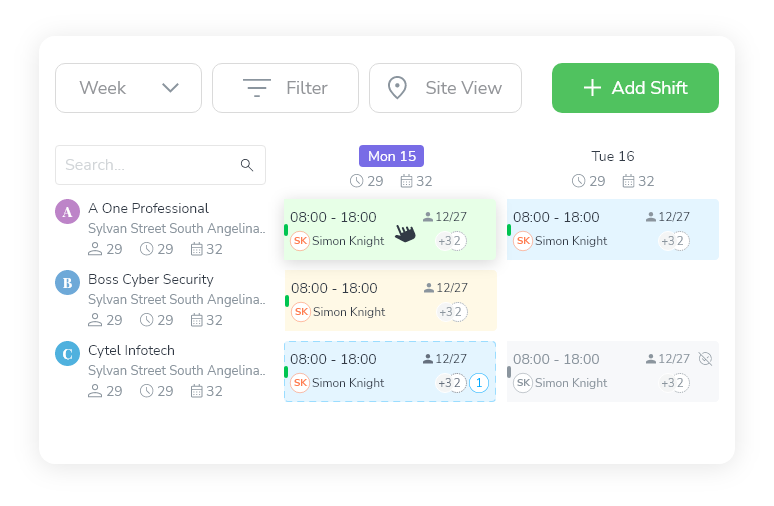
Smart Security Guard Scheduling & Shift Management
Plan, assign, and monitor guard shifts effortlessly
Key Features
 Drag-and-Drop SchedulingEasily create, modify, and assign shifts of your security guards with our all-in-one security guard software
-
Multi-View CalendarTable, Monthly, and Custom views for better staff scheduling that can be customized accordingly
-
Recurring Shift TemplatesEasily create weekly and monthly schedules of your security guards and optimize security guard management.
-
Shift Confirmation WorkflowSecurity guards can accept shifts on the go, and prevent double bookings and overlaps


Real-Time GPS Tracking with Geofencing
Know where your guards are with the mobile patrol app
Key Features
-
Mobile Clock-In/Out with GeofencingPrevent off-site check-ins with our security guard tracking software.
-
GPS-Based Task ManagementAssign location-specific tasks and make sure they’re completed only at the right place
-
Live Guard Location TrackingTrack security guards in real-time and see their movement across job sites, monitor patrol routes, and instantly verify on-site presence
-
Self-Clock-In RestrictionsAvoid early punches, buddy punching, and unapproved check-ins with advanced restrictions.
-
Real-Time AlertsGet instant alerts when a guard checks in, takes a break, goes off-route, or logs overtime
Reporting & Checkpoint Tours
Track every patrol, analyze performance, and stay audit-ready
Key Features
-
Live Dashboard AnalyticsInstantly monitor ongoing guard activity through a real-time dashboard. View active shifts, current locations, ongoing tours, and task completions as they happen
-
Shift & Attendance ReportsUnderstand which guards showed up, when they checked in, how long they stayed, and if they completed their assigned shifts
-
Checkpoint Tour ReportsAutomatically track every checkpoint your guards visit. Know exactly which locations were covered, which were missed, and whether they were visited on time
-
Site-Specific ReportsGet filtered insights per client, location, or property. Whether you're managing 5 sites or 50, Novagems lets you compare data across sites.
-
Automated Report SchedulingEliminate manual follow-ups. Schedule daily, weekly, or monthly reports to be sent directly to your inbox or your clients’.
-
Incident & Compliance ReportsKeep detailed logs of on-site incidents, safety violations, or unusual events. These reports help you stay compliant


Task Management & Accountability
Ensure every checkpoint is completed and nothing slips through.
Key Features
-
Task Assignment per ShiftAssign duties clearly and track progress in our security guard app.
-
Task Completion AlertsReceive instant notifications when tasks are completed or missed in our app
-
Selfie Verification for Proof of PresenceReal-time photo confirmation that confirms security guard presence at job sites
-
Permanent Log & History TrackingKeep the data of all activities, edits, and completions for accountability
Compliance & Certification Monitoring
Always stay compliant without the paperwork
Key Features
-
License & Certification Expiry AlertsOur security guard software automatically alerts managers before any credential expires
-
Audit-Ready LogsMaintain time-stamped records of incidents and compliance-related activities
-
Custom Compliance ReportsGenerate reports by guard, site, or shift to meet regulatory needs


Payroll & Timesheet Automation
Save time, reduce errors, and simplify payroll.
Key Features
-
Automated Pay CalculationsCalculate regular, overtime, double-time, and holiday pay
-
Flexible Pay Rate ManagementSet custom pay structures based on job roles, locations, or shift types
-
Payroll Export OptionsExport timesheets easily to integrate with accounting or HR systems for optimized security guard management.


Updates
Latest Feature Updates

Visitor Management
Lone Worker Protection
Chat System
Security License Management
Timesheet
Customer success is our priority



Our customer reviews
Join 15,000+ highly productive team members

Harul S.
President
“Novagems has made scheduling and day-to-day monitoring much easier for our team, while giving us better visibility into our operations.”

Katherine S.
Site Manager“Novagems pulls scheduling, attendance tracking, GPS monitoring, and reporting into a single platform. It's made our day-to-day so much smoother.”
Matt Lumb
Manager
“It makes work easy and efficient—a great solution for management”

Tameka R.
Interim Administrative Manager“Novagems' top features scheduling, GPS monitoring, checkpoints, and timekeeping”
Sam
Manager“Novagems simplifies guard management with easy setup and guided support.”
Richard S.
Manager“Panic Alert ensured timely backup, preventing a mishap. Thanks, Novagems!”
MUHAMMAD K.
Director“User-friendly system, 24/7 support, quick response, effective reports, and a professional team.”
Nathan O
Managing Director“All-in-one platform for staff rostering, attendance tracking, and payroll verification.”
Jerome Bell
Manager“We love the app! It made security supervision easy during COVID.”
Andrew
Site Incharge“As a guard, I found the app easy to use. It enables quick supervisor interaction and is very helpful. ”
William
Manager“With years as a guard, I find this solution a game-changer—smart tech at its best.”
Neha S.
HR / Admin“Great tool for managing security teams efficiently”
Albert D.
Director of Technology“Great customer service and decent software at a reasonable price”
Nicholas B.
Director of Operations“Completely Satisfied”
Geet A.
Sales“Helpful and easy-to-use workforce management tool”
Want to see Novagems on your own operation?
Book a free 15-minute demo and we'll show you exactly how it handles your scheduling, patrols, and reporting, with no setup required.
Knowledge
Interesting Topics
What Constitutes a Strong Security Team?
Strong built, a clean background, some relevant guarding experience, additional training on the job and a smart app on guarding solutions that keeps you updated on the latest posts and orders.
GPS Tracking
A tool that brings accountability to the forefront. You can’t watch your security officers 24 hours a day. With our tech, you don’t have to. Just set it up once, and get automated alerts, reports and analytics on whether your people are doing the right work or not.
Scheduling Software
A user-friendly system that gives the business owner and employees a better way to work, collaborate and manage shifts. Replace manual tasks of resource allocation with a solution that can fit anywhere anytime.
Novagems is an all-in-one security guard management software used by 500+ security companies across the US and Canada. It combines scheduling, GPS tracking, checkpoint tours, incident reporting, and payroll timesheets in one platform. Pricing is per active user only, you don’t pay for guards on leave. Setup takes 1-2 business days with 24/7 support on all plans.
What Is Security Guard Software?
Security guard software is a platform that helps security companies manage scheduling, GPS tracking, guard tours, incident reporting, and payroll from one system. It replaces spreadsheets, phone calls, and paper logs with automated workflows that save 10+ hours per week and give managers real-time visibility into every guard and every site.
The security guard software market is valued at over $2 billion in 2026 and growing at 14.5% annually, driven by rising client expectations for transparency, real-time accountability, and digital proof of patrol.
Modern security guard software typically includes:
| Feature | What It Does | Why It Matters |
|---|---|---|
| Employee scheduling | Drag-and-drop shift assignment with conflict detection | Build weekly schedules in minutes, not hours |
| GPS tracking | Real-time guard location on a live map | Prove guards are on-site without phone calls |
| Geofencing | Virtual boundary around each site | Prevent off-site clock-ins and buddy punching |
| Checkpoint tours | NFC or QR scanning at patrol points | Verify guards completed every patrol stop |
| Incident reporting | Guards file reports from their phone with photos | Professional documentation delivered to clients instantly |
| Client reporting | Clients receive reports, patrol data, and coverage proof | Builds trust and justifies contract pricing |
| Payroll timesheets | Accurate hours exported to payroll | Eliminates manual timesheet calculations |
| Overtime alerts | Warnings before a guard crosses 40 hours | Prevents non-billable overtime before it happens |
Pricing
Novagems charges per active user only. You don’t pay for guards on leave, off-season, or not currently scheduled.
- All features included in one plan, no add-on modules or upsells
- 24/7 support on all plans
- No long-term contracts, month-to-month billing
- 14-day free trial
Security Guard Management Software: Direct Answers
What is a security guard management system?
A security guard management system is a software platform that security companies use to schedule guards, track their location during shifts, verify that patrols and checkpoints were completed, capture incident reports from the field, and produce proof-of-service reports for clients. It replaces the paper log sheets, spreadsheets and phone calls that most security firms still coordinate shifts with. The core difference from general workforce software is verification: a security system has to prove a guard was physically at a location at a specific time, which is what clients pay for.
What does a security guard management system actually do?
A complete system covers six functions:
| Function | What it produces |
|---|---|
| Scheduling | Published shifts, open-shift fills, overtime alerts before payroll |
| GPS tracking and geofencing | Live guard location; clock-in only inside the site boundary |
| Checkpoint verification | Timestamped NFC or QR scans proving each patrol point was visited |
| Incident reporting | Field reports with photos, GPS coordinates and time attached |
| Client reporting | Proof-of-service documents generated from patrol and incident data |
| Time and attendance | Payroll-ready timesheets built from verified clock-ins |
How is security guard software different from general workforce software?
General workforce tools schedule people; security software proves what those people did. Platforms like Connecteam, Deputy or When I Work handle shifts and time tracking well, but they have no concept of a post order, a checkpoint tour, a patrol route or a client-facing proof-of-service report. For a security company those are not extras, they are the deliverable the contract is written around.
Does a security guard management system work without a signal?
Yes, on Novagems. Guards complete checkpoint scans and file incident reports offline, and the device syncs when the connection returns. This matters on rural patrol routes, in underground parking and inside large buildings, where a system that requires constant connectivity leaves gaps in the record.
What does security guard management software cost?
Novagems prices per active user, so you pay only for guards who are actually scheduled, on month-to-month billing with no contract. Unlimited sites, managers and routes are included on every plan, and there is a 14-day free trial. See pricing for current rates. Across the wider market, entry-level security guard software starts around $5 per user per month, while enterprise platforms are quote-only and significantly higher. For a like-for-like comparison of eight platforms, see best security guard management software.
Frequently Asked Questions
Security guard tracking software helps security companies monitor, manage, and track their guards in real time. It uses GPS, geofencing, and mobile check-ins to ensure guards are present at assigned locations and performing their duties as scheduled.
With Novagems, you can track guard patrols live through GPS and checkpoint tour monitoring. The system shows each guard’s current location, completed checkpoints, missed rounds, and time logs; everything updates instantly on your dashboard.
Yes, Novagems offers a user-friendly mobile patrol app for both security guards and supervisors. Guards can clock in, complete tasks, and get updates directly from their phones, while managers can track everything from their mobile dashboards.
Contract security guard firms typically use guard-specific workforce platforms rather than generic shift apps. The category includes Novagems, TrackTik, Silvertrac, and Belfry. Novagems is used by 500+ security and cleaning companies and combines scheduling, GPS tracking, checkpoint tours, incident reporting, and payroll timesheets in one platform, billed per active user.
Yes. Novagems combines guard scheduling and GPS tracking in a single platform. Managers build shift schedules and see each guard's real-time location, geofenced clock-ins, and live patrol path on the same dashboard, so shift assignments and proof guards are on-site live in one system instead of two disconnected tools.
Yes. Novagems includes time and attendance with GPS geofencing that verifies on-site clock-ins to prevent buddy punching, plus payroll-ready timesheets and overtime alerts that warn managers before a guard crosses 40 hours, eliminating manual timesheet calculation and non-billable overtime.
Yes. Guards file incident reports from the mobile app with photos, GPS location, and timestamps attached automatically. Managers then share branded patrol and incident reports with clients, turning proof-of-service into a client-retention and contract-justification tool.
Related Resources
Security Software by Region
Key Features for Security
Compare Novagems
Get Started
Start being productive & grow your business
with Novagems



