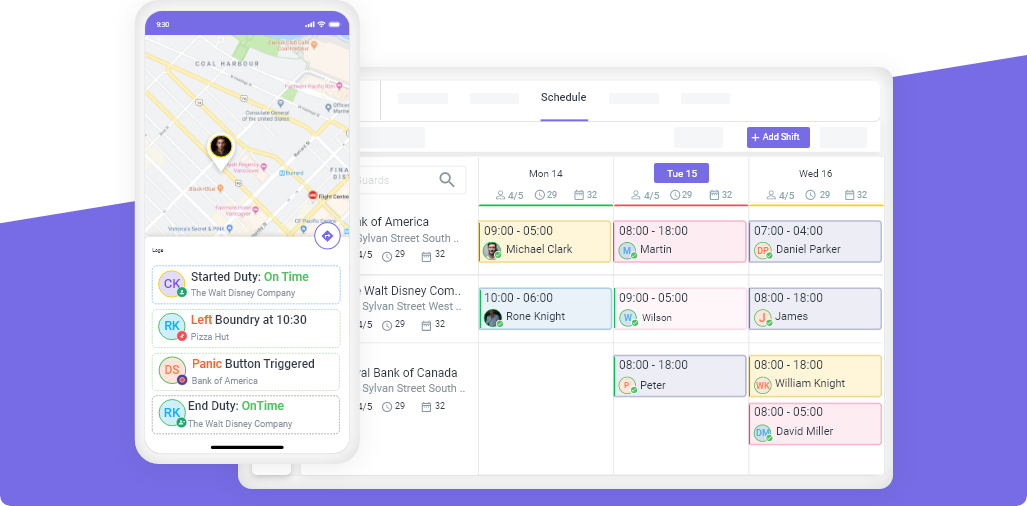
Cleaning company management software is a digital platform that helps cleaning businesses schedule staff, track employee locations, manage client accounts, handle invoicing, and monitor job completion — all from one system.
Without it, most cleaning companies manage their workforce through a combination of text messages, spreadsheets, and phone calls. That works for a team of three. It breaks down at fifteen.
What Cleaning Company Management Software Does
The right software handles the core operational tasks that consume most of a cleaning business owner’s time:
| Function | Without Software | With Software |
|---|---|---|
| Scheduling | Manual, rebuilt every week | Templates, drag-and-drop, auto-assign |
| Tracking employees | Phone calls, guesswork | Live GPS on a dashboard |
| Proving work is done | Client takes your word for it | Digital time-stamps, photos, reports |
| Handling no-shows | Scramble to call replacements | Automated alerts + open shift posting |
| Overtime management | Discovered at payroll | Flagged during scheduling |
| Client communication | Manual calls and emails | Automated reports and notifications |
The 8 Features That Matter Most
1. Employee Scheduling
Scheduling is the most time-consuming task for most cleaning company managers. Good software reduces a 3-hour weekly task to 30 minutes.
What to look for:
- Copy/repeat recurring schedules rather than rebuilding from scratch each week
- Conflict detection — blocks you from double-booking the same cleaner
- Weekly hour visibility — shows how many hours each employee has already been scheduled so you can balance workload and prevent overtime
- Shift confirmation — cleaners confirm their shift through the app so you know who’s showing up before the day starts
2. GPS Tracking and Geofencing
GPS tracking shows you where your cleaning staff are in real time. Geofencing automatically clocks employees in and out when they enter or leave the job site — preventing time theft and eliminating manual time entry.
According to workforce management research, cleaning companies that implement GPS geofencing reduce payroll fraud by an average of 12–18% by eliminating early clock-outs and phantom check-ins.
What to look for:
- Real-time location visibility on a map
- Geofence radius configuration per site (e.g., 100m for an office building, 500m for a large facility)
- Automatic clock-in/out alerts when a cleaner arrives or leaves
3. Job Completion Verification
Clients don’t want to take your word that a job was done. They want proof — especially for high-value facilities like hospitals, schools, and commercial offices.
What to look for:
- QR code or NFC scanning at client locations to timestamp job completion
- Photo uploads — cleaners can attach before/after photos to a completed job
- Digital checklists — cleaners mark off tasks as they complete them, creating a record the client can view
4. Time and Attendance Tracking
Manual timesheets are routinely inaccurate. Studies show that approximately 75% of businesses lose money to time theft, with the average employee overstating their hours by about 4.5 hours per week.
Good time tracking software ties clock-in/out to GPS location, making it impossible for a cleaner to clock in from home.
5. Open Shift Management
When a cleaner calls in sick, you need to fill the gap fast. The best systems post the open shift to qualified, available employees automatically — rather than requiring you to call through a list manually.
What to look for:
- Automatic posting to eligible cleaners only (filtered by certification, location, availability)
- First-come, first-served auto-fill, or approval-required mode
- Push notifications to employees’ phones
6. Task Management and Checklists
Different client sites have different requirements. A restaurant clean requires different tasks than an office clean. Software that lets you build site-specific checklists ensures your team knows exactly what to do at each location.
What to look for:
- Site-specific task lists attached to each job
- Completion tracking (checklist items checked off by cleaners in real time)
- Supervisor sign-off capability
7. Client Reporting
Clients — especially commercial clients — want documentation. Automated reports build trust and reduce the number of “did your team visit on Thursday?” calls.
What to look for:
- Automatic report generation after each visit
- Reports that include: time in/out, GPS confirmation, checklist completion, and any incidents or notes
- Branded report format (your company name, not the software company’s)
- Email delivery directly to clients
8. Payroll Integration
Export clean time and attendance data directly to payroll rather than manually reconciling timesheets.
What to look for:
- Integrations with common payroll platforms (ADP, QuickBooks, Gusto)
- Overtime calculation built in
- Hourly employee clock data exportable in standard formats
Cleaning Company Software Comparison
| Software | Best For | Cleaning-Specific? | Starting Price | Free Trial |
|---|---|---|---|---|
| Novagems | Cleaning + security companies | ✅ Yes | Custom | ✅ 14 days |
| Jobber | Service business management | ✅ Cleaning-focused | $49/month | ✅ 14 days |
| Swept | Janitorial companies | ✅ Janitorial-specific | $50/month | ✅ |
| Connecteam | General field workforce | ❌ Generic | $29/month | ✅ 14 days |
| Deputy | Scheduling-focused businesses | ❌ Generic | $4.50/user/month | ✅ 31 days |
How Much Does Cleaning Company Software Cost?
Pricing for cleaning company management software typically falls into three tiers:
Budget ($20–$50/month): Basic scheduling and communication. Good for very small companies (under 10 employees). Usually lacks GPS tracking and client reporting.
Mid-range ($50–$150/month): Includes GPS tracking, scheduling, and some reporting. Suitable for companies with 10–50 employees.
Full-featured ($150+/month or custom): Complete scheduling, GPS, job verification, client reports, and payroll integration. Best for companies with 50+ employees or multiple client locations.
When calculating cost, factor in the time saved per week. If software saves your manager 8 hours per week on scheduling and administration, at $25/hour that’s $200/week in recovered productivity — significantly more than the software cost.
Signs You Need Cleaning Company Software
- You’re spending more than 2 hours per week manually building schedules
- Clients have complained about a missed visit or incomplete job
- You’ve had payroll disputes because timesheets were inaccurate
- You’ve lost a client you couldn’t retain because you couldn’t prove service quality
- A supervisor had to be physically present to verify a job was done correctly
- You’ve had a no-show that you discovered only when the client called
How to Evaluate Software Before You Buy
Ask these questions during a demo or trial:
- Can I see all my employees’ locations on one map right now?
- How does a cleaner confirm they’ve arrived at a job site?
- What does the client report look like — can I see a sample?
- How does the system alert me if a cleaner hasn’t shown up?
- Can I copy last week’s schedule with one click?
- Does it work if a cleaner has no signal at the job site?
- How long does setup take for a new client location?
Frequently Asked Questions
What is cleaning company management software?
Cleaning company management software is a platform that digitizes the core operations of a cleaning business — employee scheduling, GPS-based time tracking, job completion verification, client reporting, and workforce communication. It replaces manual processes like spreadsheets and phone-based coordination.
What software do cleaning companies use?
The most common software options for cleaning companies include Novagems (for companies managing both cleaning and security operations), Jobber (service business management), Swept (janitorial-specific), and general workforce platforms like Connecteam and Deputy. The right choice depends on company size and whether you need industry-specific features.
How does GPS tracking help cleaning companies?
GPS tracking lets cleaning company managers see exactly where their staff are in real time. Combined with geofencing, it automatically records when cleaners arrive at and leave each job site — eliminating manual timesheets, reducing time theft, and generating verified attendance records that can be shared with clients.
Can cleaning company software help with client retention?
Yes. Automated client reports that show visit timestamps, GPS check-ins, completed checklists, and staff photos are one of the most effective tools for retaining commercial cleaning clients. When clients can see documented proof that every service was completed on time, they’re significantly less likely to switch providers.
How much does cleaning company software cost?
Cleaning company software ranges from around $29/month for basic scheduling tools to $150+ per month for full platforms with GPS tracking, job verification, and client reporting. Most platforms charge per user or per location. Novagems offers a 14-day free trial so you can evaluate the full feature set before committing.
What’s the difference between janitorial software and cleaning business software?
The terms are largely interchangeable. Both refer to platforms designed for commercial or residential cleaning operations. “Janitorial software” sometimes refers specifically to platforms focused on large-facility commercial cleaning (hospitals, offices, schools), while “cleaning business software” can refer to either commercial or residential cleaning companies.
Last updated: March 2026
Try Novagems free for 14 days → — Built for cleaning companies of all sizes.
See Novagems in action
Join 1,000+ security & cleaning companies that replaced spreadsheets with Novagems.
✓ 14-day free trial · ✓ Free onboarding · ✓ Cancel anytime