How Modern Security Companies Document Guard Activities
Published on: Tue, Jan 6, 2026
Read in 18 minutes
Key Takeaways
- Mobile apps with GPS tracking, photo uploads, and instant reporting have replaced handwritten logs.
- Clients today expect instant updates. Digital guard reporting makes this possible.
- Modern security guard activity reports include precise location data and exact timestamps. This level of detail protects you from disputes and proves your guards were where they were supposed to be.
- The ability to attach multimedia evidence directly to reports has become standard. Courts recognize time-stamped images with GPS metadata as reliable evidence, which can make or break legal cases.
Picture this: It’s 2 AM, and your security guard just discovered a break-in attempt at one of your client sites. What happens next could make or break your company’s reputation. Will your guard fumble with a paper logbook in the dark, trying to remember every detail? Or will they pull out their phone, tap a few buttons, and send a complete digital guard reporting package with photos, GPS coordinates, and timestamps directly to you and the client?
The way security companies document guard activities has completely transformed over the past few years. What used to take hours of paperwork now happens in minutes with just a few taps on a smartphone. And honestly? The companies that haven’t made this shift are struggling to compete.
According to recent industry data, over 64% of property managers say that poor or missing activity reports negatively impact their ability to handle liability claims. That’s not just inconvenient—that’s expensive. But here’s the good news: modern digital solutions are making it easier than ever to keep accurate, detailed records that protect both your guards and your business.
Let’s talk about how modern security companies document guard activities, why the old methods don’t cut it anymore, and what technology is making the difference in 2026.
Traditional vs. Modern Methods of Documenting Guard Activities
Let’s face facts regarding how the documentation process for guards worked in the past, since many security companies are currently doing it this way.
The Old Way: Paper Logs and Post Orders
The traditional way of documenting guards involves maintaining a notebook at each of the locations. The guards carry a notebook and note entries about all that they see. The incident report involved carbon paper. The daily activity report would go to a notebook that would be picked up every week (or every month, if I am to be honest).
This is what it all looked like:
The guards begin their shift at 10 PM. They record the time in the logbook—if they remember. As they patrol, they might write down a couple of things: “Checked north gate, all secure.” Perhaps they encounter an open door and record that in the logbook, too. The details of what they found? The specific time they found it? Photos taken? Usually after the fact.
If there was a serious incident—like a trespasser, an accident, or a fire alarm—the guards were required to write up a separate incident report. They’d write all this by hand, try to get contact information from a witness, and maybe even make a sketch. Then they’d call their supervisor to report what had occurred. The written report wouldn’t even get to the office until the next day, when someone retrieved it.
What Was Wrong With This Approach?
It is hard to begin. Handwritten reports often could not be read. The guards forgot the important information before they could sit down to write it out. There was no record of when the report was made. The guard could fill in the information hours or days later.
Time entries were not reliable because they were dependent upon guards observing the times and recording them. Location information was unverifiable. If a guard said he checked the parking lot at 2:15 a.m., you have to believe him.
The photos needed separate cameras, and these pictures were not necessarily connected to the reports. In most instances, the pictures did not even make it to the reports. The soldiers would take the pictures using their cell phones and either fail to transmit them or misplace them in terms of which incident they belonged to.
These reports sometimes vanished into thin air. The paper will get lost, ruined, or tossed by accident. When you want to refer to an incident from six months prior, good luck finding that particular sheet of paper in the filing cabinet.
The best part? The clients had zero visibility. They were paying for security services but didn’t know what was going on at their site until someone phoned them or they received a weekly report—possibly handwritten and copied on a fax machine.
The Modern Way: Digital Guard Reporting
Compare this with how current security firms now document guard activity.
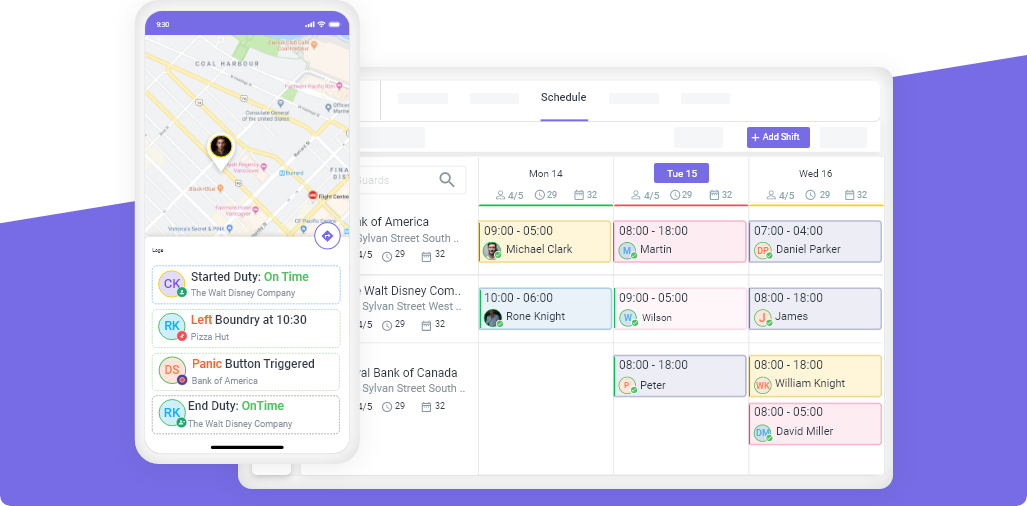
The guards have smartphones that contain special security guard software. Upon the commencement of each guard’s workday, the guard logs into work using the application, and the system automatically records the exact timing and the guard’s location. The guard scans the checkpoints by reading the QR codes or tapping the NFC tags positioned across the facility.
“Everything happens in real-time.” A security guard, spotting something unusual, such as an open window, unusual occurrences, or a problem with the facilities, opens the app to file an “incident report.” They choose the type of incident from a “drop-down menu,” enter the requisite details, snap photos and videos within the app itself, and submit. The incident report receives an immediate timestamp, with GPS data embedded within the file itself.
Such a report is sent directly to the supervisors and can also be automatically sent to the clients. Within seconds, everyone who needs to know is notified. The client can log in to his portal and see the incident report with all the pictures and details while the event is still in progress.
At the end of the shift, the system has already compiled a complete daily activity report. This is reviewed by the guard, who then enters any final corrections, after which the report is submitted. This is automatically cloud-stored, making it searchable by anyone who has the relevant permission.
How Modern Security Companies Document Guard Activities
Let’s break down exactly what this looks like in practice across different aspects of security operations.
Mobile-First Incident Reporting
Modern incident reporting systems begin with mobile apps developed specifically for security tasks. Security guards use mobile phones or tablets for incident reporting purposes as their primary device.
In case of an incident, the guard opens the app and chooses the menu option “New Incident Report.” The app will provide him or her with a systematic form to report all the details of the incident required by the system, which include the following:
- What kind of incident is this?
The app allows you to select from categories such as trespassing, theft, medical emergency, fire alarm, property damage, and other incidents.
- Who was involved?
The guard can enter names, descriptions, vehicles, and contact information of those who were present.
- What exactly happened?
There’s a text field for narrative description, but unlike paper forms, this is typed text that’s always readable.
- Where did it occur?
GPS automatically tags the precise location. If the property has multiple buildings or zones, the guard can select the specific area from a map or list.
- When did it happen?
The app timestamps everything automatically, so there’s no chance of errors or disputes about timing.
- What evidence is there?
Guards can attach photos, videos, or audio recordings directly from their phone’s camera. The app embeds metadata showing exactly when and where each piece of media was captured.
- What action was taken?
The guard documents their response. Whether they called police, contacted a supervisor, administered first aid, secured the area, or took other steps.
This entire process takes just a few minutes, and the report is complete, accurate, and immediately available.
GPS-Verified Patrol Tracking
Among the most significant game-changers in security guard activity reports is GPS verification. Presently, their location is tracked constantly throughout their tour of duty.
Here’s how it works: The guards have either their phones or GPS devices. When they are patrolling, the system logs the movement, leaving a trail that indicates where the guards have gone.
Security firms can also create geofenced checkpoints around premises. When an officer enters a geofenced checkpoint, the system automatically generates an entry in the record. It ensures that the officer did visit the place and that it was at that particular time—it eliminates the need to rely on an officer’s statement that they actually visited the place.
In some cases, QR codes/NFC tags are placed at the checkpoint locations. The guards check these with their mobile phones as they go from place to place. All these checks are recorded with accurate GPS locations and times. Clients can track locations checked at their parking lots at 11:45 PM, their loading docks at 12:30 AM, and so on.
This level of verification does several important things:
- It holds the guards accountable for the actual completion of their patrol routes. If the guard is expected to scan eight spots in a shift but only captures six, the supervisors are immediately informed.
- It shields the guard from false accusation. For instance, if the client states that the guard did not check the area, the GPS records will provide evidence to the contrary.
- It gives evidence for billing your clients. You can demonstrate to your clients exactly where your personnel went and how long they stayed there as you bill them for patrol services.
Real-Time Client Communication
Modern digital guard reporting transforms client relationships. Instead of clients wondering what’s happening at their property, they get instant visibility.
Many security guard scheduling software platforms include client portals. When your guard completes an incident report, clients receive an automatic notification. They can log in and see the full report with photos, GPS data, and all relevant details.
For daily activities, clients can receive automated summaries showing what happened during each shift: how many patrols were completed, which checkpoints were visited, any incidents that occurred, and overall site status.
This transparency builds tremendous trust. Clients aren’t left in the dark hoping everything is fine—they have real-time proof of the service they’re paying for.
Structured Daily Activity Reports
Daily Activity Reports (DARs)—now those were the old guard’s worst nightmare, having to sit down and fill those things out when the shift ended, and all you wanted was to go home and catch some Z’s.
Contemporary systems make this process painless. Throughout this shift, as guards record patrol activities, scan checkpoints, and record events, in the background, they are automatically developing their DAR.
Upon the end of each shift, the guard is required to review a report that is prefilled with the following:
- Start and end shift times (auto-logged by GPS clock-in and clock-out).
- List of all patrols conducted and times recorded
- Checkpoints visited, including scan times
- Any incidents noted (supplemental detail has been recorded in a separate incident report)
- Equipment checks conducted
- Visitors recorded
- Comments and observations entered during the shift
Guards can enter final comments if required, check them for accuracy, and click “Submit.” The entire process takes several minutes compared to the previous 20 to 30 minutes that it would have taken to put all the comments in writing by hand.
Don’t know how to write one DAR? I have you covered! Click here to learn how to write a daily activity report
Multimedia Evidence Collection
One of the most powerful features of modern guard documentation is the ability to capture and attach multimedia evidence seamlessly.
When they find any case of graffiti, they take a photo. When they find an open door, take a photo. If they notice anyone acting in a suspicious manner, they record a video. Everything is taken through the smartphone’s camera, which automatically connects to the case file.
Here’s where it becomes incredibly useful: the metadata. Each and every image and video contains embedded information that reveals the following:
The date and time of its taking (tamper-proof timestamp). The actual GPS coordinates of where it was taken. And the guard who took it—that particular incident that the particular report is linked to.
This court acknowledges this type of evidence as reliable. Why? Since it is easily verifiable and not easily replicable or forged. If your security guard activity report finds itself in court, having this level of documentation will make a world of difference.
Cloud-Based Storage and Retrieval
All this information, reports, pictures, GPS tracks, and patrols are all clouded for safe storage. It resolves an enormous problem posed by paper documentation, which was the retrieval and preservation of the information.
Looking for that report from eight months ago about that incident? Just search by date, location, name of the guard, type of incident, or keywords. The system will retrieve it in seconds.
Many states have regulations concerning the record-retention period that is required for specific industries. The state of New Jersey demands that these records be maintained for five years in an archive. Digital record-keeping is automatic: these reports are also stored securely as long as they are needed—no more bulging files.
Cloud storage ensures that your files are backed up and secured. For example, in case your office floods or burns down or gets burglarized, you do not end up losing all the files that you have accumulated over time. All your files are stored elsewhere.
Best Practices for Documenting Guard Activities in 2026
Technology is a crucial tool, but what matters most is how you utilize it. The following are the best practices of modern security companies that existing ones need to follow:
-
Train Guards Completely on Digital Tools
Your documentation will only be as strong as the people who are documenting. Spend the time training the guards you have on the mobile patrol app. Teach them how to document thoroughly. Teach them how to take pictures that will actually document what they document.
Ensure that the guards know the importance of accurate documentation—not only from the company’s side but from their personal side as well. Accurate documentation of an incident can shield the guard from an accusation of wrongdoing or from lawsuits.
-
Create Templates and Standards
One of the benefits of digital systems is their ability to standardize reporting. Develop templates for common incidents. Create checklists for patrol activities. Use dropdown options for common types of incidents and actions taken.
This standardization serves several purposes. As it allows reports to be completed quickly, it eliminates the potential for forgetting something of importance, and it provides consistency throughout all of your guards and facilities.
-
Emphasize Real-Time Reporting
They should report things as they occur, not when they finish their tour of duty. This is because they will record things when they are still fresh. They will not take long to respond when something urgent happens.
Establish the need to submit incident reports within 15-30 minutes of a reported incident rather than after a few hours.
-
Review and Provide Feedback
The supervisors should look at the guards’ reports and give them feedback on them. When guards are reporting things like “everything was fine” on a regular basis, train them to be more descriptive. When another guard is taking great pictures and is writing lengthy descriptions, reward them for that.
Review can also assist you in identifying any patterns, such as events that occur a certain number of times at a given location, which could require extra attention or consideration.
-
Use Reports for Client Communication
Don’t leave all that information on paper. Share feedback with your clients on a regular basis. Establish a weekly email routine reporting patrol activity rates, problems resolved, and site status.
When clients see the level of your security guard service reports, it goes a long way towards making renewal contracts much easier.
-
Ensure Compliance with Legal Requirements
There are standards set by various states and various industries concerning the security documentation required. Ensure your digital reporting system satisfies this requirement.
For instance, some countries may require that a particular piece of information be provided in incident reports. Some may determine the retention periods for records. Incorporate these into your templates.
-
Leverage Data for Operational Improvements
Digital guard reporting systems provide an abundance of information. Leverage the information to optimize operations. Determine which locations record the highest incidents. Determine which shifts experience the highest volumes. Determine which guards respond to calls effectively and which need training.
A decision-making approach using data for security management sets professional security companies apart from those that are making decisions through gut feel.
How Novagems Helps Security Companies Modernize Guard Documentation
If you’re thinking, “This is all great, but how do I go about making this happen?” then services like Novagems exist.
Novagems is targeted towards security companies that want to transform the guard reporting process implemented in modern security companies. The effectiveness of this tool relies on the following:
- All-in-One Mobile App
The security personnel have one application on their smartphones, which does all their tasks. The personnel can use GPS to punch in, patrol, scan checkpoints, file reports of incidents, capture pictures, and communicate with their bosses all at once.
This ease of use ensures that the guards actually follow it all the time. When they require five different applications or systems, the rate of compliance goes significantly down.
- GPS Tracking and Geofencing
Novagems has in-built GPS tracker functionality, allowing you to view in real-time where the guards are. Create geofences on premises belonging to the clients, so if the guards are accessed, you are notified.
Checkpoint verification is done through GPS, QR codes, or NFC tags, whichever is most effective for a given location. The guards patrol and verify their checkpoints by scanning them, ensuring that their routes are beyond question.
- Instant Digital Guard Reporting
When guards make incident reports using the Novagems app, they are immediately viewable to both supervisors and clients. The software has reporting templates that are customizable to ensure that reporting is done efficiently and effectively.
Photo and video uploads are done directly from within the app, with all respective metadata being preserved in the process. Say goodbye to asking guards to forward photos in an email or questioning the actual date photos were shot.
- Automatic Daily Activity Reports
Novagems is capable of automatically compiling activity reports for the security guards based on all the data that has been collected during the shift. The guards need to review and submit rather than try to recall all that occurred.
Such reports are professional, detailed, and consistent—everything a client wants to see.
- Cloud-Based and Searchable
Everything is stored securely in the cloud with automatic backups. Search through months or years of reports in seconds. Generate compliance reports, analyze trends, or pull specific incidents when needed.
- Compliance and Audit-Ready
The system provides complete audit trails that indicate who made or altered a report and when. Time-stamped and GPS-enabled data provides a documentable trail that will stand up in court. Policies for retaining the results of these tests can be established and configured to meet the needs of the states and the industry you operate in
- Scalable for Growth
Whether you are handling 10 guards or 1,000, it scales with you. Add sites, guards, and clients with automatic scaling. The complexities are handled by the automation.
- Integration with Other Operations
Novagems is more than just reporting—it links to all of your scheduling, timesheets, and payroll programs. When the guard clocks in through the app, it generates timesheets. When they finish a patrol, they check that they were in the right place based on their schedule.” This means that data is automatically transferred from system to system, thus eliminating any repetition in entries.
The bottom line? Novagems makes reporting your digital guards hassle-free. All the while giving you pro-level reporting that keeps your business and clients impressed. See what your daily report will look like by clicking here!
FAQs
What is digital guard reporting?
Digital guard reporting is the process of documenting security guard activities using mobile apps and cloud-based software instead of paper logs. Guards use smartphones or tablets to create incident reports, log patrols, capture photos/videos, and record daily activities. This method is faster, more accurate, and provides better accountability than traditional paper-based systems.
How do modern security companies document guard activities differently from before?
Modern security companies use mobile apps with GPS tracking, real-time reporting, and multimedia evidence collection. Clients receive instant notifications about incidents rather than waiting for end-of-shift reports or weekly summaries. Cloud storage replaces filing cabinets, making records searchable and accessible from anywhere. The biggest difference is accountability. Modern systems prove what guards did, where they were, and when activities occurred.
What should be included in security guard activity reports?
Comprehensive security guard activity reports should include shift start/end times with GPS clock-in location, a list of all patrols completed with checkpoint scan times, detailed descriptions of any incidents with the 5 Ws (who, what, when, where, and why), photos or videos as evidence, actions taken by the guard, people involved including witnesses, equipment checked, visitors logged, and any unusual observations or conditions.
Why is GPS important in guard documentation?
GPS verification serves several critical purposes. It proves guards were physically present at locations they claim to have checked, creates tamper-proof timestamps that can’t be backdated, provides exact location data for incidents, which helps with investigations and insurance claims, holds guards accountable for completing assigned patrol routes, and protects guards from false accusations about not being where they should have been.
How long should security companies keep guard activity reports?
Retention requirements vary by state and industry. Many states require at least one to three years. High-security facilities or government contracts may have longer requirements. Best practice is to keep digital records for at least five years, since storage costs are minimal with cloud-based systems. Always check your state’s Private Patrol Operator (PPO) regulations and any specific client contract requirements.
Can clients access guard activity reports in real time?
Yes, modern security guard scheduling software platforms include client portals that provide real-time access to reports. When guards submit incident reports or complete patrols, clients receive notifications and can log into their portal to view all details, photos, and GPS data. This transparency has become a standard expectation in the industry. Clients can also download daily summaries, review historical data, and monitor ongoing shift activity.
Get a Free Trial
Sign up For Newsletter
Latest Blog Posts


Get Started
Start being productive & grow your business
with Novagems